
AI Power for Your Business: Claude or ChatGPT, Connected to Synergy
Ask in your own words. Check it. Press Save.
Your AI works with your real Synergy data: it drafts the quotation, reads the supplier PDF, answers questions about your books and writes the report. You check the result and press Save. Works with Claude and ChatGPT, on your own plan.
WhatsApp 012-530 0800 ▶
How it works
What you can ask
Ten short videos. Tap a picture to play.
Drop a PDF, get a draft
Drop a supplier invoice PDF into the chat. The AI reads it, Synergy suggests the form, matches the supplier and items and checks the tax. You open the draft, check it and press Save.
 ▶
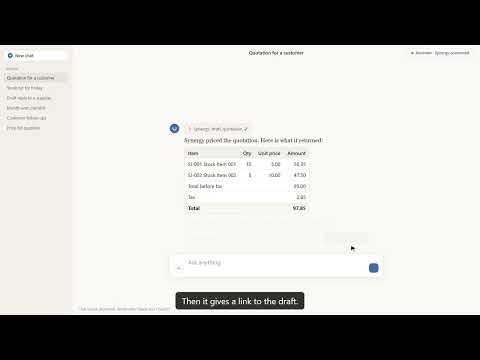
A quotation from one sentence
Tell the AI the customer, the items and the discount. Synergy looks them up, prices the quotation the way your company does, and gives you a link to a draft that is already filled in.
 ▶
Make my receipt look like this
Show the AI a receipt you like and ask for yours to look the same. Synergy prints a preview first, and nothing is saved until the administrator says yes. Undo is one sentence.
 ▶
Change your invoice layout by asking
Ask for a change to your invoice in plain words. Synergy draws the invoice with the change so you see it before anything is saved. It changes how the document looks, never the figures on it.
 ▶
Ask your business anything
Ask why sales jumped or who owes you the most, in your own words. Synergy adds up the figures from your own books, the AI explains them, and the real report opens as a PDF.
 ▶
Your morning briefing
Ask what needs your attention today. Synergy gathers sales, overdue money, stock problems and documents waiting, and can show what is still open before you close the month.
 ▶
Chase money, restock on time
See who needs a payment reminder, with your own message ready to send, and which items to reorder by supplier. Synergy drafts the purchase order. You check it and press Save.
 ▶
Teach it once
Correct the AI one time and ask Synergy to remember it. The boss approves the suggestion, and the next document from the same supplier arrives with the right form and account already filled in.
 ▶
Safe by design
The AI sees only what each person is allowed to see, it cannot change how Synergy works, and it never saves for you. You open the draft in Synergy, check it and press Save.
 ▶
Connect in two minutes
Switch on the connection in Synergy, add a custom connector in your AI app, then choose the company, sign in with your own Synergy login and press Allow.
 ▶
Safe by design
Connect in about two minutes
- In Synergy, the administrator switches on Allow AI apps to connect to this company and copies the address.
- In Claude or ChatGPT, add a custom connector and paste the address.
- The AI app opens a Synergy page. Choose the company, sign in with your own Synergy user name and password, and press Allow.
Then ask in your own words. New to Synergy? See our AI accounting software, accounting software and POS system.
The chat screens in the videos are illustrated. The figures, names, messages and links in them come from real replies of the Synergy connector on sample company data. The Synergy pages are real recordings. No real customer or staff data is shown.
Frequently asked questions
Does it work with Claude and ChatGPT?
Yes. Synergy connects to both through a custom connector. The AI runs on your own Claude or ChatGPT plan.
What can the AI see in my Synergy data?
Only what your own Synergy login is allowed to see. Each person connects with their own user name and password, so the AI follows the same access rights as that person.
Will the AI save or post things by itself?
No. The AI prepares a draft and a link. You open it in Synergy, check it and press Save. It cannot save, post or delete anything by itself.
Can I undo a change to a layout?
Yes. Synergy keeps every version of a document layout, and undo is one sentence.
How do I get a demo?
Message us on WhatsApp 012-530 0800 and we will show you with your own kind of business.