
Stock Take App for Android: Count Stock with Your Phone
Scan barcodes with the phone camera, count shelf by shelf and load the count straight into Synergy. No more count sheets to retype.
Inventory App That Turns Any Android Phone into a Stock Take Scanner
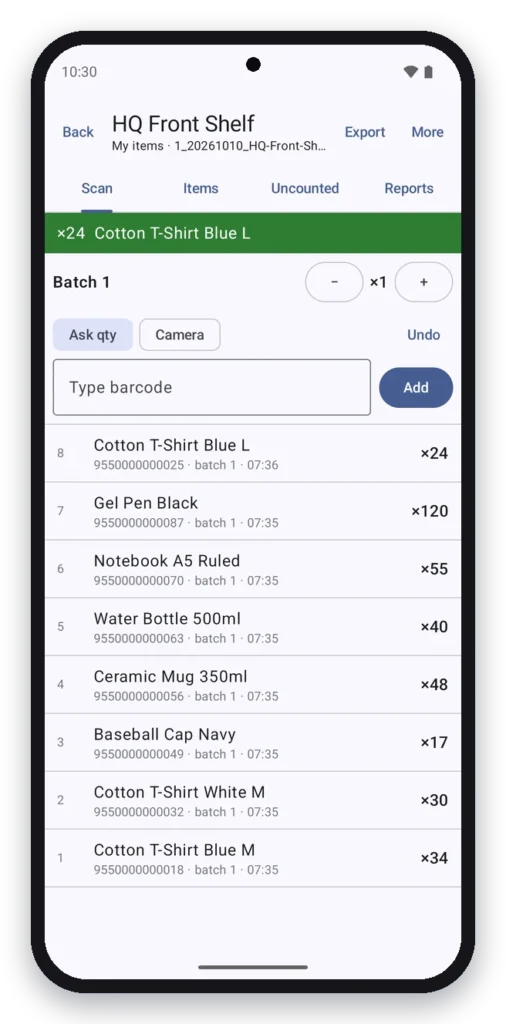
A stock take app replaces paper count sheets. Staff walk the shelves, scan each item with the phone camera and key in the quantity. The counts are checked against the system quantity, so you see what is missing or extra before you adjust stock.
The Synergy stock take app runs on ordinary Android phones and works with Synergy inventory management. Several staff can count at the same time, each with their own scanner ID.
See the Stock Take App in Action
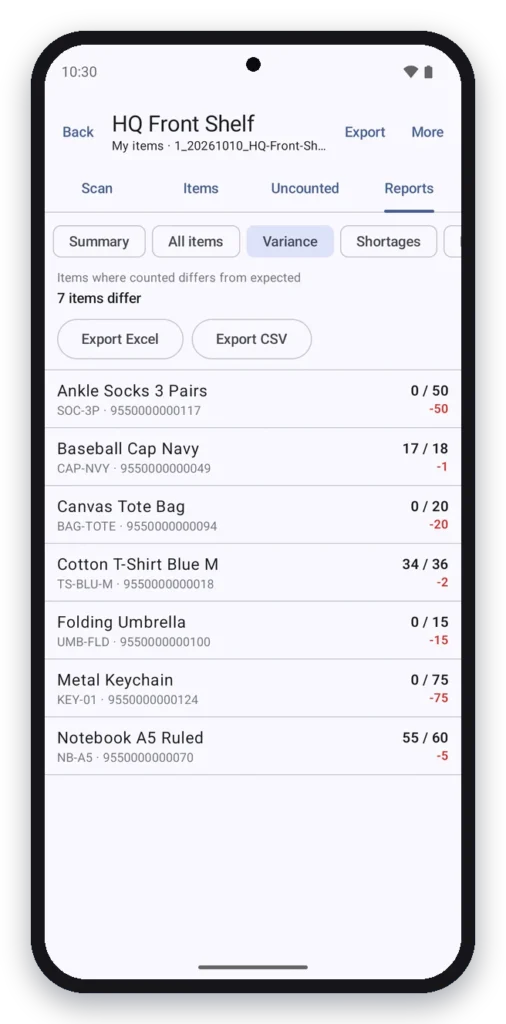
Watch a stock take on an Android phone: start a count, scan barcodes, enter quantities, check the items not counted yet and review the variance report.
Signs you need a stock take app
- Stock take means printing count sheets and retyping them afterwards.
- The shop or warehouse closes for a whole day to count.
- Counts do not match the system and nobody knows which shelf is wrong.
- Items are missed because no one can see what has not been counted.
- You only have one barcode scanner for the whole team.
What the stock take app does
Camera barcode scanning
Scan item barcodes with the phone camera. Unknown barcodes are flagged straight away.
Blind count
Staff count without seeing the system quantity, so the count is honest.
Batches and scanner IDs
Split the count into batches by shelf or area, with a scanner ID for each phone.
Uncounted items list
See which items have not been counted yet before you finish.
Variance report
Compare counted against expected quantity and check the differences.
Load into Synergy
Send the count to Synergy to adjust stock, or use standalone mode with CSV and Excel import and export.
No Synergy yet? Standalone mode lets you import an item list from CSV or Excel, count with the app and export the results.
Who uses the stock take app
| Business | How they use it |
|---|---|
| Retail shops and minimarkets | Monthly or yearly stock take shelf by shelf |
| Pharmacies | Counting many small items with barcodes |
| Warehouses and distributors | Several staff counting different areas at once |
| Hardware and spare parts shops | Cycle counts of fast-moving items |
| Multi-outlet businesses | Counting each outlet and loading every count into one system |
Stock take app vs count sheets
| Paper count sheets | Synergy stock take app | |
|---|---|---|
| Counting | Write by hand, then retype | Scan and key in on the phone |
| Scanners | Buy dedicated scanners | Use the Android phones you have |
| Missed items | Found after the count, if at all | Uncounted list shows them during the count |
| Differences | Worked out in a spreadsheet | Variance report ready at once |
| Updating stock | Adjusted by hand | Loaded into Synergy |
Why Synergy for stock take
- Since 2011, 6,000+ clients. A Malaysian software company with local support.
- Part of one system. Counts flow into Synergy inventory, POS and accounting.
- Phones instead of scanners. Use ordinary Android phones; dedicated scanners are optional.
- Training included. We help you plan and run your first stock take.
Inventory Management
Stock balance by branch, transfers, adjustments and stock card reports.
Retail POS
Sell from the same item list your staff count with the app.
Works with
A stock take app that works with your inventory
The app loads counts into Synergy inventory management. New to stock take? Read our guides: How to do a stock take, Cara buat stock take and Barcode inventory system.
Frequently asked questions
An app that lets staff count stock on a phone instead of paper sheets: scan each barcode, enter the quantity and compare the count with the system.
No. It scans barcodes with the Android phone camera. A dedicated scanner is optional.
Yes. Each phone has its own scanner ID, and the count can be split into batches by shelf or area.
Yes. Standalone mode imports an item list from CSV or Excel and exports the counted results.
The app lists the items not counted yet, and the variance report shows counted against expected quantity.
The stock take app is for Android phones.