
F&B POS System Malaysia: All-in-One POS System for Restaurants & Cafes
Synergy F&B POS runs the front counter and the kitchen of restaurants, cafes, kopitiams and food courts across Malaysia. Take orders by table, send them to the right kitchen printer or screen, split bills in seconds, and keep selling when the internet is down. Pay once from RM800, or subscribe from RM2.20 a day, with LHDN e-Invoice included. Watch the F&B POS demo videos.
What's Included in Synergy F&B POS
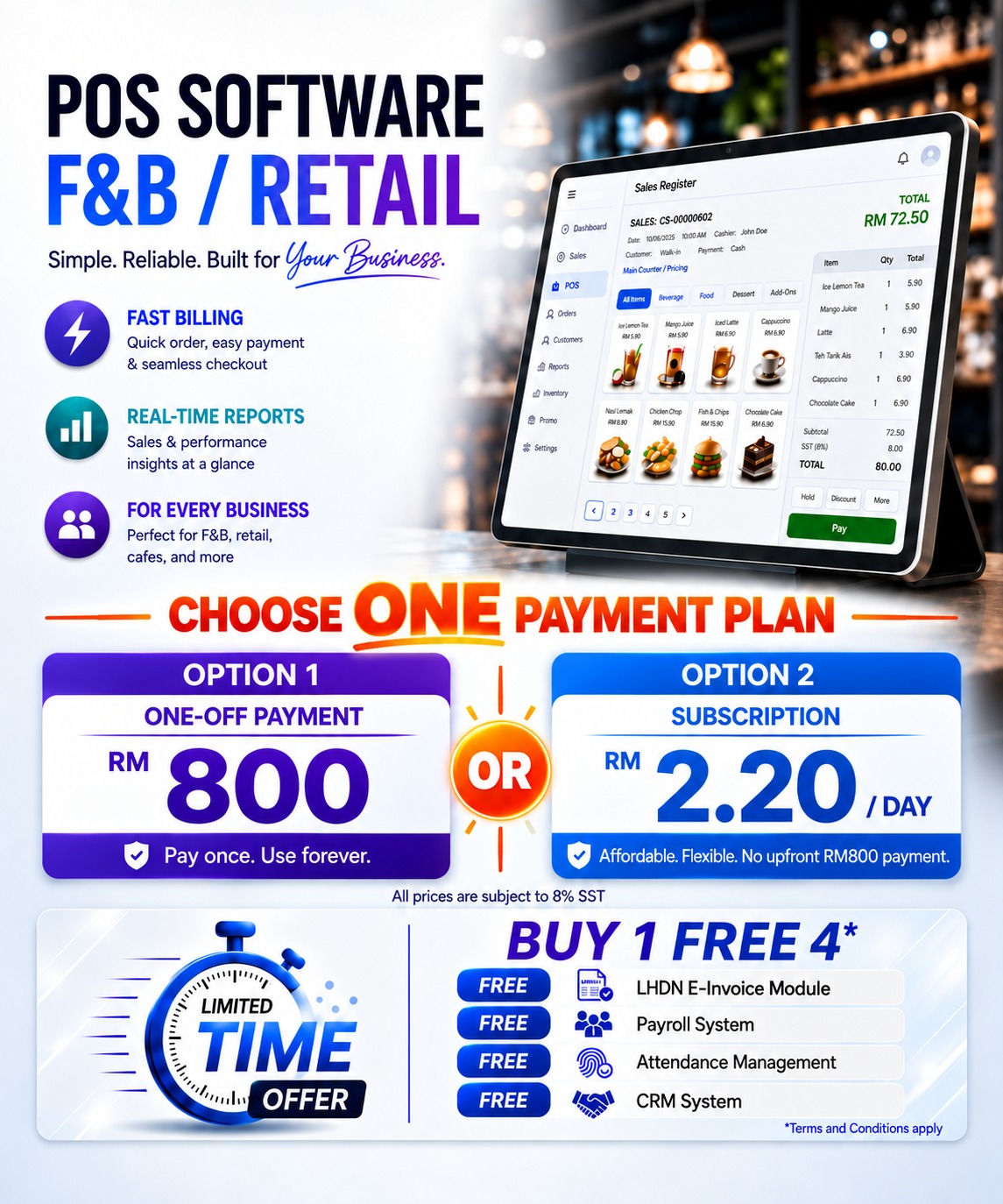
- POS Software
- Support Multiple Pricing / Advance Pricing
- Customer Loyalty Program (Membership, Promotion Discount, Coupons, Point or Rewards or Redemption, Blast SMS)
- Sales Reports
- Send Receipts by "WhatsApp"
- Automatic Send Daily Sales & Closing Reports
- E-Wallet / Credit Card Terminal Integration with POS
- LHDN E-Invoice Module
- FREE Training
- FREE Software Support
POS Software
Support Multiple Pricing / Advance Pricing
Customer Loyalty Program (Membership, Promotion Discount, Coupons, Point or Rewards or Redemption, Blast SMS)
Sales Reports
Send Receipt by "WhatsApp"
Automatic Send Daily Sales & Closing Reports
E-Wallet / Credit Card Terminal Integration with POS
LHDN E-Invoice Module
FREE Training
FREE Software Support
Android POS
Android POS for Restaurants: Tablet or Mobile
Install Synergy F&B POS on an Android tablet or mobile phone. Waiters take orders at the table, orders go straight to the kitchen, and bills are paid on the same device.
Also in the Android POS:
- 📦Stock: when linked to Synergy, see the POS stock balance on the device. Without a link, the main device keeps the stock count: receive, adjust and count stock. Out-of-stock items show a warning, and you can choose to block their sale.
- 🎁Bundle promotions: bundle prices set in Synergy POS also apply to orders from the app.
- 🖨️Receipt printers: Bluetooth, network (LAN) and USB thermal printers.
- ✏️Menu editing on the device: without a link, change items, prices and photos on the device, protected by a manager PIN.
Want customers to order by themselves? See our self-order kiosk and QR ordering.
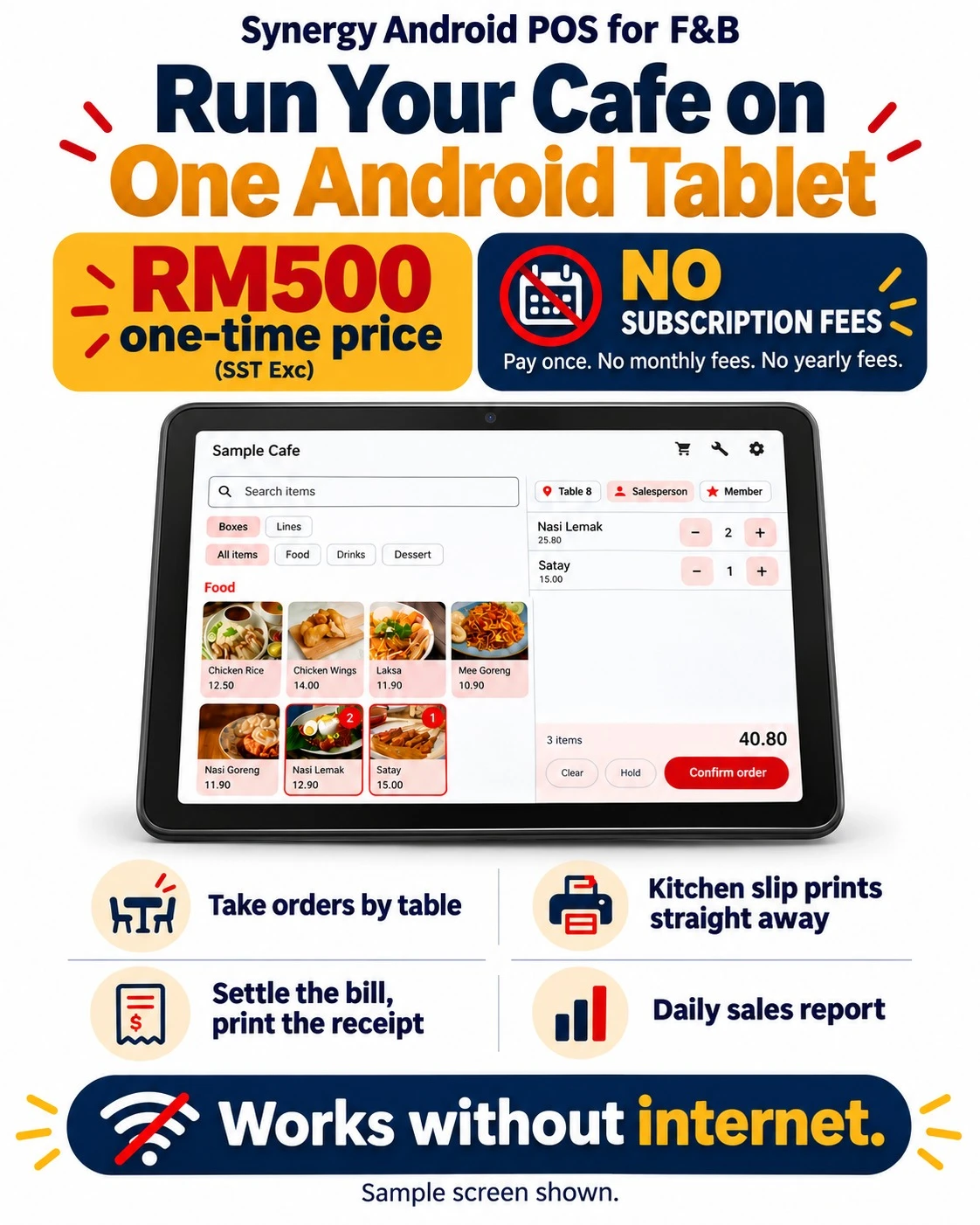
Stand-alone: a café on one Android phone
No server or internet needed: choose the table, tap the dishes and confirm, and the kitchen slip prints straight away. Add more to the same table’s bill, then press Pay, choose cash, card, e-wallet or other, and the receipt prints with the change.
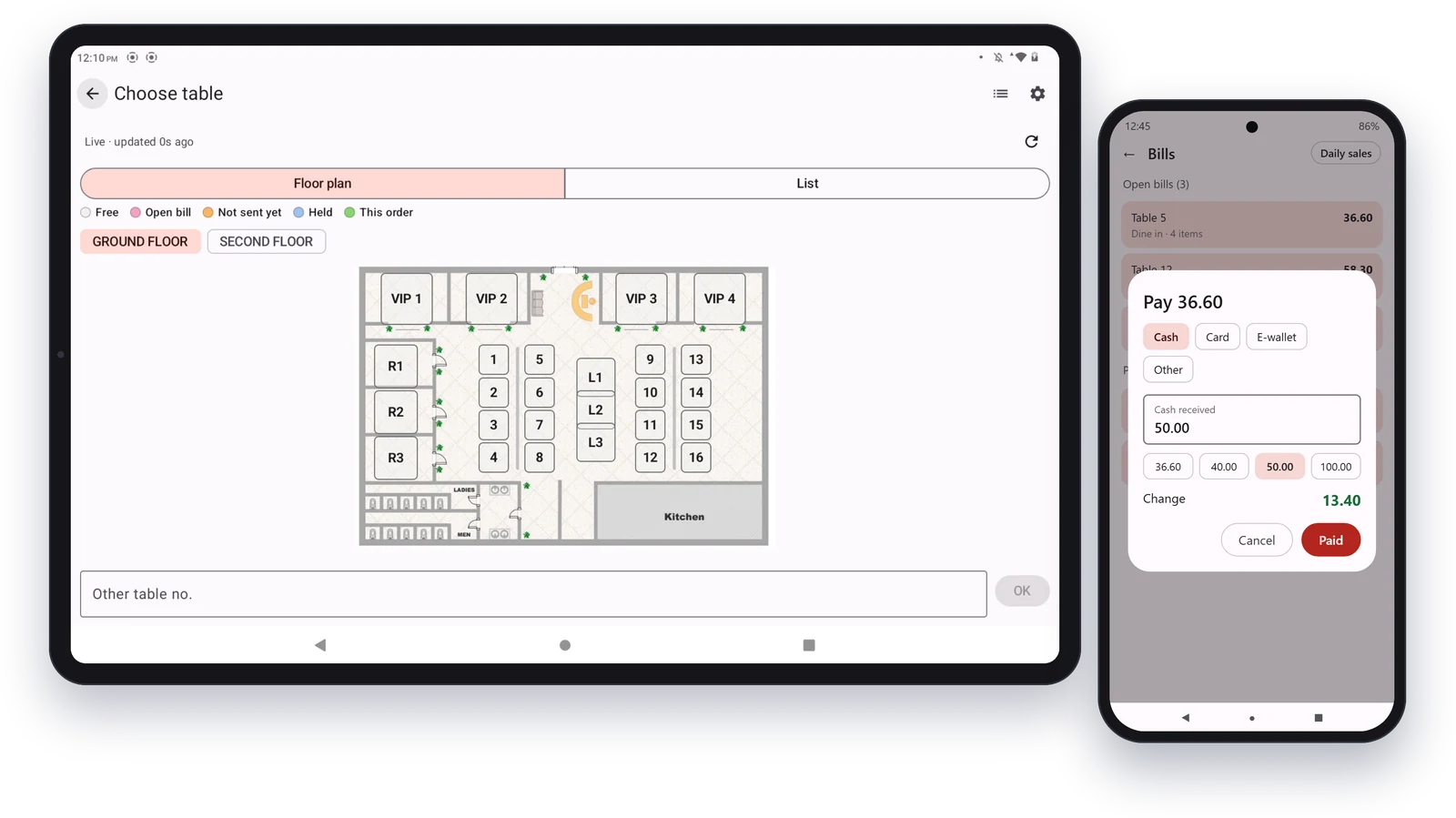
Choose the table and print in the kitchen
On an Android tablet, choose the table on the floor plan, add the dishes and press Confirm order. Food prints on the kitchen printer and drinks on the bar printer, each with the table number on top. When the guests order more, only the new items print.
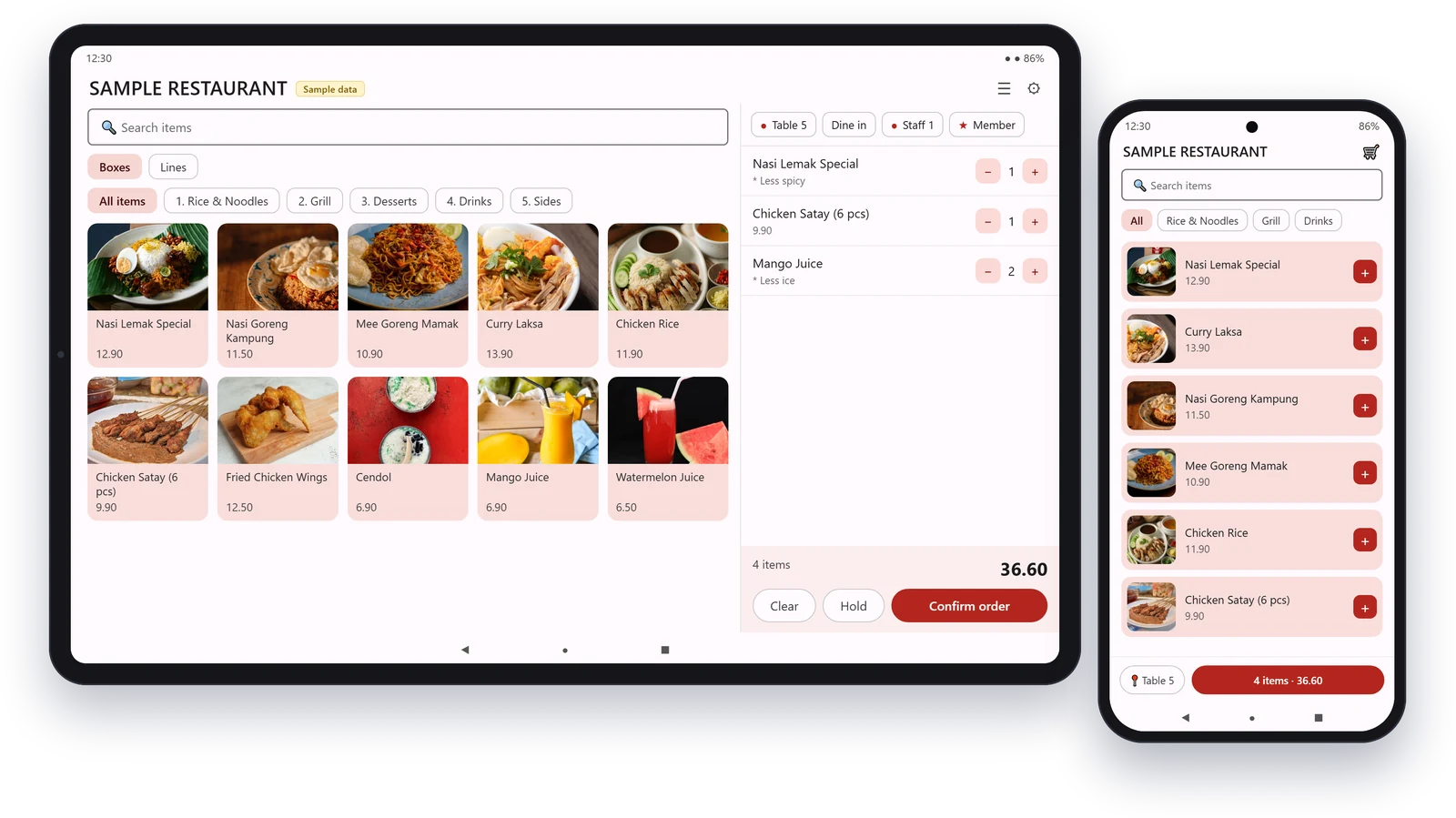
Photo Menu
- Pick items from photo menu buttons, add remarks such as less sweet, then confirm the order.
Live Table Layout
- Choose the table from your floor plan and see which tables are free, open or held, updated live.
Dine-in or Takeaway
- Mark each order as dine-in or takeaway, and tag the staff member and the customer's membership.
Hold and Send to Kitchen
- Hold an order while the customer decides, then send it to the kitchen printer. Each order prints its own kitchen slip.
Bills and Payment
- See open and paid bills and take payment by cash, card or e-wallet. The change is worked out for you.
Daily Sales
- Check the day's sales on the device at closing.
See the Restaurant POS Software in Action
Real screens from Synergy F&B POS at a sample cafe: tap dishes on the picture menu, seat guests from the floor plan, and send the order to the kitchen.
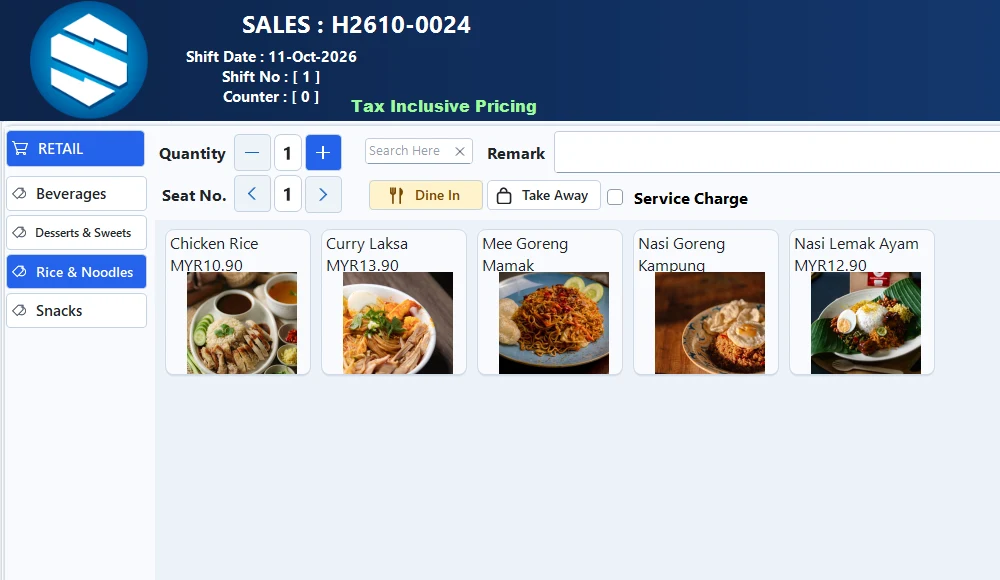
Picture menu
Group dishes and drinks by category with photos, so new staff find items in seconds. Dine-in or takeaway is one tap.
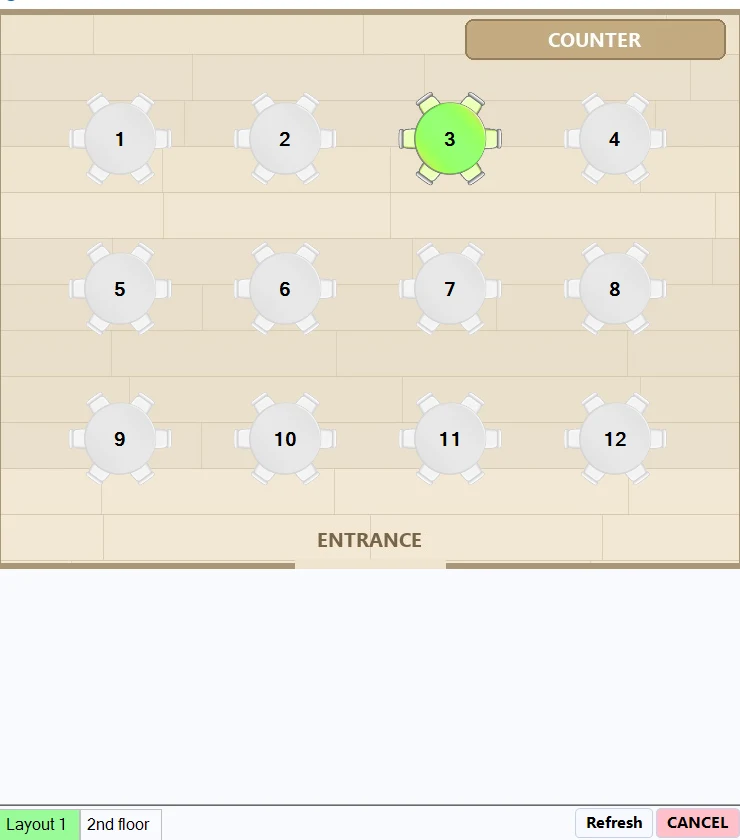
Table layout
Pick the table from the floor plan. Tables in use are highlighted, and the guest count is kept with the bill.
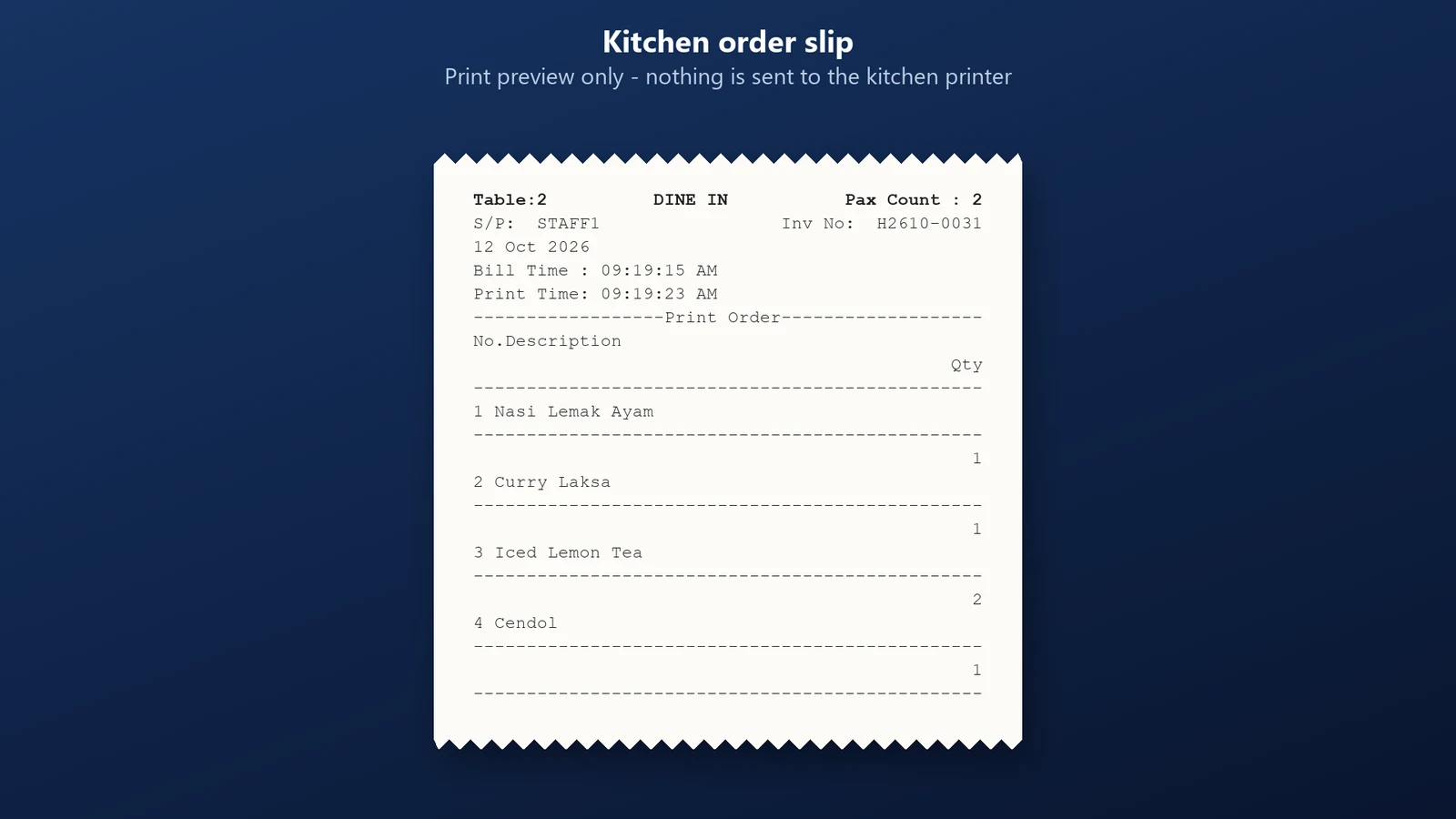
Kitchen order slip
Each order prints a kitchen slip with the table, guests and dishes, so the kitchen starts cooking straight away.
Watch: dine-in and takeaway orders
Watch: table selection and kitchen slip
POS System Malaysia
Restaurant POS System Features for Restaurants and Cafes
New to restaurant POS? Read our restaurant POS buying guide.
Menu Buttons
- Set up food and drink buttons on the POS screen the way your staff work.
Table Layout
- Draw your floor plan and see which tables are open, ordering or waiting to pay.
Item Colours
- Give each item its own button colour so staff find it faster.
Add-On Items
- Add-ons such as extra rice or extra cheese are added to the order and charged automatically.
Order Remarks
- Remarks such as less sugar, less oily or less spicy are recorded on the order and printed in the kitchen.
Linked Items
- Link variations of one item, such as coffee hot or cold, or rice small, regular or large, in one tap.
Kitchen Printing
- Orders print in the kitchen as soon as they are taken.
Payment Order
- Print a temporary bill for the table before payment.
Join Tables
- Merge several tables into one bill for a group.
Split Bill
- Split one bill into several, by item or by person.
Multiple Kitchens
- Drinks go to the bar printer and food to the kitchen printer automatically. Several kitchens are supported.
Raw Material Tracking
- Set a recipe (bill of materials) for each dish, and selling it deducts the raw materials from stock in Synergy inventory.
Service Charge
- Add a service charge to dine-in bills automatically, and switch it off for a bill when needed.
Change Table
- Move an order to another table. The kitchen gets a change-table note, so the food goes to the right table.
Pax Count
- Record how many guests are seated at each table.
Deposits
- Take a deposit from a customer and use it when the bill is paid.
Time-Based Promotions
- Run lunch or tea-time promotions that start and end at the times you set.
Void with Reason
- Every voided sale needs a reason, so owners can review cancellations.
POS System Malaysia
QR Ordering, Kitchen Display and Payments
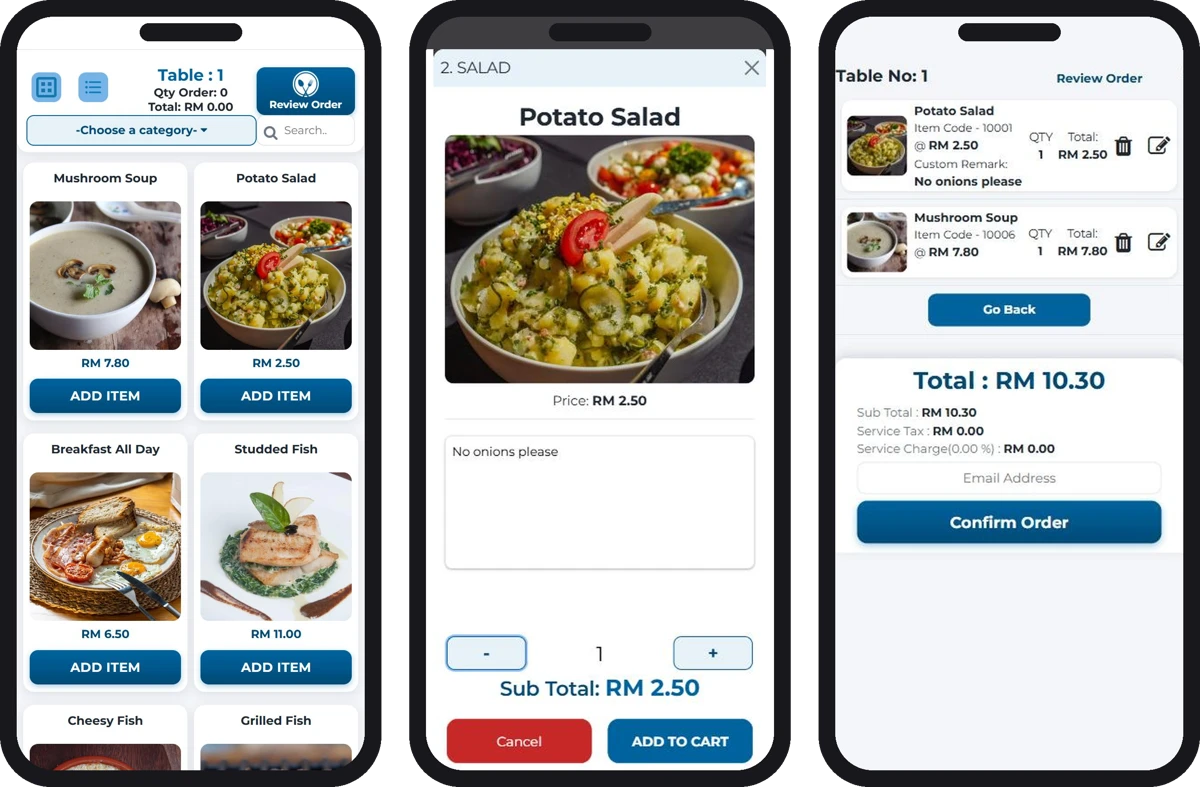
QR ordering (add-on): guests order from their own phone, and the order goes straight to the kitchen and into Synergy POS.
1. The guest scans the QR code on the table. There is no app to download.
2. They pick dishes from the menu with photos and add remarks such as “no seafood”.
3. They review and confirm, and the order reaches the kitchen with the table number.
Why restaurants use it: serve more tables with the same staff, fewer wrong orders, bigger bills from food photos and add-ons, and faster table turnover. See Synergy QR ordering.
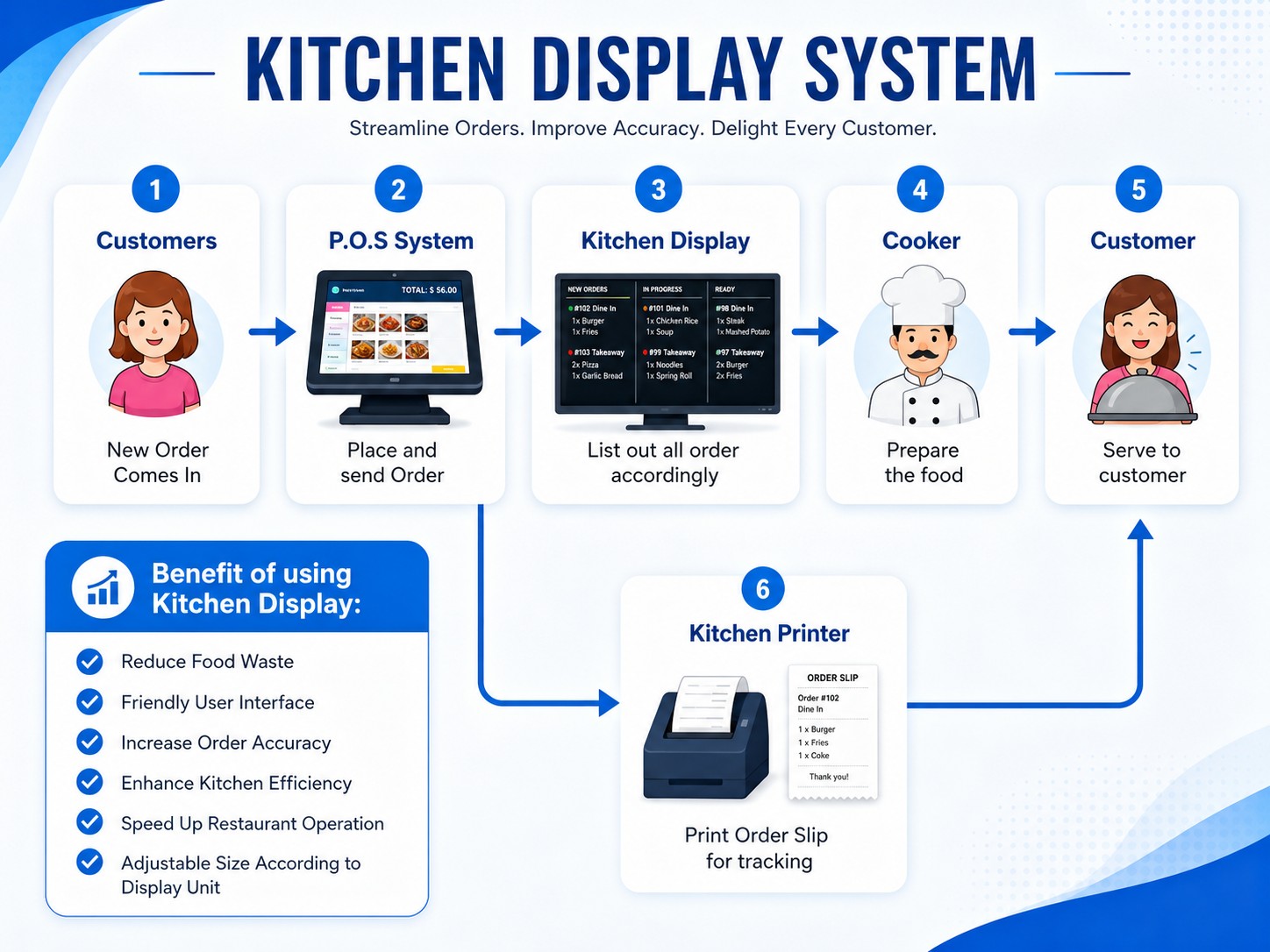
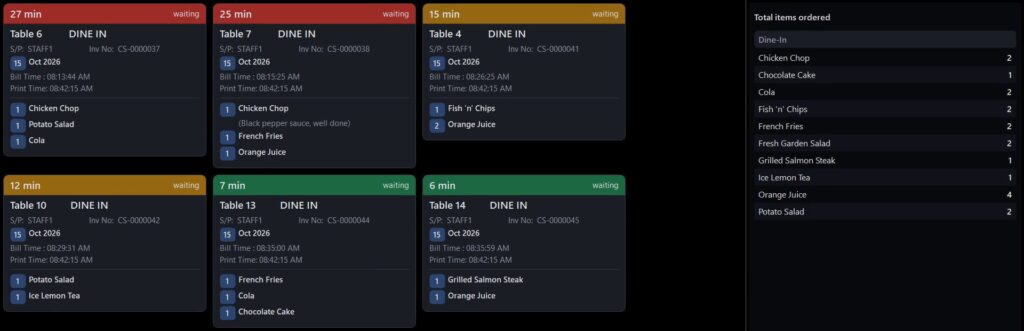
Kitchen display system (KDS): orders appear on a kitchen screen instead of paper, as cards showing the table and the dishes. Each card turns from green to amber to red as the order waits, a side panel totals every item still to cook, and cooks mark an order as served with one tap. Included with Synergy POS.
Every Payment Type at Your POS Counter
Payments: cash with quick-cash buttons and change, card, e-wallet, voucher, points, cheque and credit. Split one bill across two payment types, such as part card and part cash, and the receipt lists each payment. Card terminals and e-wallets including Touch ’n Go, GrabPay, Boost, ShopeePay, Alipay and WeChat Pay are supported.
Table Reservations for Restaurants and Cafes
Take table bookings in Synergy POS. See every table for the day, book one or several tables for a group, and when the guests arrive the bill opens on their table. Sample cafe and sample bookings only.
How table booking works
- From the sales screen, open Table Booking to see the day: every table down the side, hours across.
- Double-click a free space to book: date, time, number of guests, name and phone, and one or several tables. A table that is already booked at that time is refused, so there are no double bookings.
- From 30 minutes before the booking, the table map shows the table as reserved with the time and the guest’s name, and turns orange when the guest is late.
- When the guests arrive, tap the table and choose that they have arrived. The bill opens on that table with the number of guests, and the booking is marked completed when the bill is paid.
- Walk-in on a reserved table? Let the walk-in use it and keep the booking, with optional supervisor approval. Mark no-shows or cancel with a reason.
Why restaurants use it: one screen for the whole day’s bookings · no double-booked tables · staff see reserved and late tables on the table map · the booking turns into the bill with no retyping. Salons and spas can take appointments by stylist with the same system.
POS System Malaysia
Counter, Payments and Multi-Outlet Features
Easy To Use
- Designed with interface that is easy to use and learn.
- User-defined shortcut Function Key for speedy input.
Multi-Store Management
- Supports Multi-Store management so that all data input can be managed in one place (Headquarters), and synchronized to all branches.
- Sales data transactions from branches update the headquarters database.
- View Stock On-hand Quantity of all branches from any store.
SMS Blasting Tool
- SMS Blast to send reminders, run promotions, and offer discounts with personalized message.
Credit Payment & Settlement Tracking
- Customer can make credit purchases, and once merchants accept payments, the POS System will keep track of customer outstandings and payments, whether in person or online.
Product Image for POS
- Able to set product image for each items and display image during POS transaction.
Multiple Payment Type
- Cash, Credit Card, Voucher, Cash Back, Credit, Cheque, Deposit and E-Wallet.
Start Shift / Multi Shift / End Shift
- Allows configuration for Single-Shift or Multiple Shift. Transactions and Cash Balance are tracked for each shift.
Cash In / Cash Out
- Maintain Accurate cash tracking by keeping records of the drawer's cash.
SST Ready
- Sales Tax and Services Tax Ready.
- Tax Rate Configuration.
- SST Tax Return Calculation.
Mall Integration Ready
- Integrate with mall to generate sales report daily and upload to mall management
Supports Multiple Pos Hardware & Adjustable Printing format
- POS hardware supports receipt printers, kitchen printers, customer display, cash drawer and more.
- Flexible adjustments to receipt and kitchen slip formats.
E-Wallet Payment / Credit Card Terminal Integration
- Integrate with E-Wallet payment (Grabpay, Alipay, WeChat Pay, WeChat Pay Malaysia Wallet, Boost, Maybank QRPay and Touch 'n Go).
- Integrate with Credit Card Merchant.
Multiple Pricing / Advance Pricing
- Supports flexible pricing.
Synergy Accounting Integration
Restaurant Accounting Software Built In
Synergy F&B POS is part of Synergy Accounting, so your restaurant’s daily sales, payment types and SST go straight into your accounts without retyping. Supplier bills, purchases, stock and payroll sit in the same system, and LHDN e-Invoice is included, so month-end closing no longer means a pile of spreadsheets.
FAQ
Frequently Asked Questions
Synergy F&B POS is a restaurant point of sale system built in Malaysia. It handles table orders, kitchen printing, payments, stock and reports, and comes from Synergy, which has served 6,000+ businesses since 2011.
Restaurants, cafés, kopitiams, food courts, bakeries and bars, from a single outlet to multi-branch chains.
Yes. Cafes use the picture menu for quick counter orders, print drinks and food at separate stations, and give member points to regular customers. A small cafe can start with one Android phone or tablet, then add more counters or QR table ordering (an add-on) as it grows.
Pay once from RM800, or subscribe from RM2.20 a day. Hardware such as POS terminals, receipt printers and kitchen printers is quoted separately. Call Ms. Lee at 012-530 0800 for a quote.
Yes. Synergy POS is installed on your own computer, so the counter keeps taking orders and payments when the internet is down.
Yes, with the QR ordering add-on. Customers scan the code at the table, order from their phone and the order goes straight to the kitchen. See Synergy QR ordering.
Yes. The kitchen display module is included with Synergy POS. Orders appear on a kitchen screen instead of paper, as cards with the table and dishes, coloured green, amber or red by waiting time. A side panel totals every item still to cook, and cooks mark an order as served with one tap.
Yes. Split one bill into several, or merge tables into one bill for a group.
Yes. Each item is assigned to a printer, so drinks go to the bar and food goes to the kitchen automatically.
Yes. Set a recipe for each dish and every sale deducts the raw materials from stock, so you see what to reorder. See Synergy inventory.
Yes. Synergy F&B POS works with Synergy Accounting, so daily sales, payment types and SST go straight into your accounts, with supplier bills, stock and payroll in the same system.
Yes. Each outlet runs its own counter, even offline, and head office sees sales and stock for every outlet in one place.
Yes. The e-Invoice module is included with Synergy POS, and walk-in sales can be submitted as monthly consolidated e-invoices. See how Synergy e-Invoice works.