
Change how the printed receipt and the kitchen slip look: start from a ready design, switch parts on or off, add your own text or a QR code, and print a test.
Before you start
- A receipt printer is set up (and a kitchen printer, if you design the kitchen slip).
- With Staff sign-in on, opening Settings needs a Manager.
Steps
1. Open the designer
Open Settings and the group Receipt & printers. In the Receipt section, below the receipt fields, tap Design receipt or Design kitchen slip.
2. Know the design screen
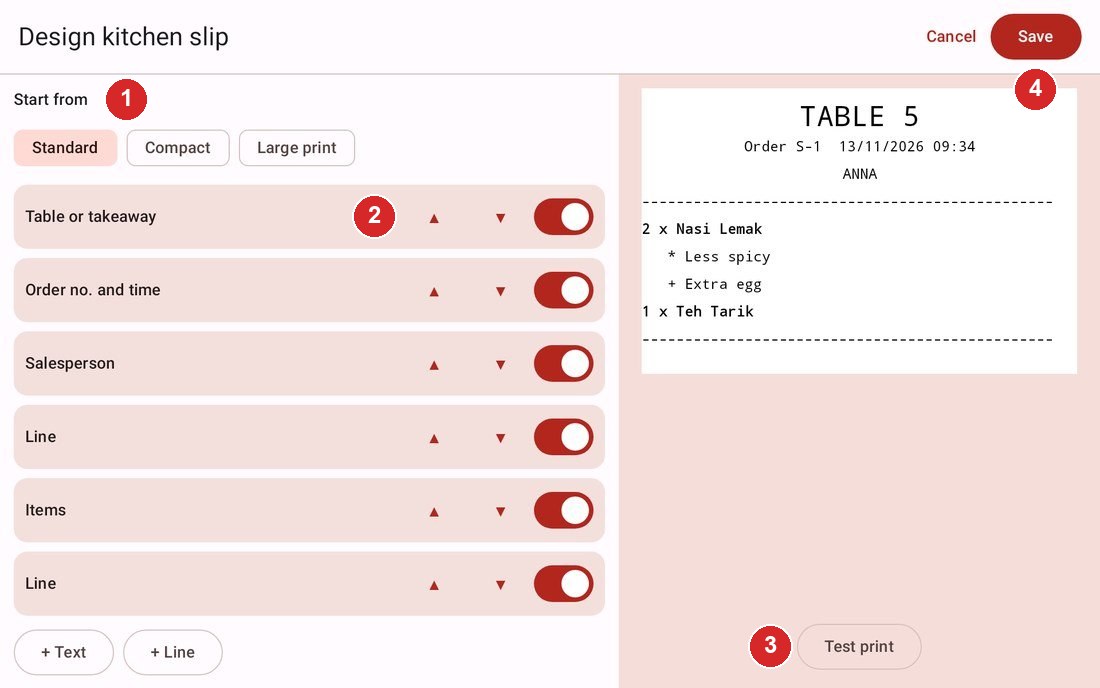
The left side lists the parts of the paper, the right side shows a preview. The picture shows Design kitchen slip; Design receipt looks the same, with receipt parts.
| Step | What to do |
|---|---|
| 1 | Under Start from, choose a ready design. |
| 2 | Switch each part on or off with its switch. The red arrows move it up or down. |
| 3 | Tap Test print to see it on paper. |
| 4 | Tap Save when you are happy. |
3. Start from a design
For the receipt, choose Standard, Compact (less paper), Detailed (logo, item codes, cashier, tax), Cafe / takeaway, Retail shop, Tax invoice, Large print, Minimal or With QR code. For the kitchen slip, choose Standard, Compact or Large print.
4. Change the parts
Switch each part on or off (for a receipt: logo, shop name, receipt no., cashier, items, totals, tax, payment, footer), move it up or down, and set its alignment (left, centre, right) and size.
5. Add your own text or a QR code
Tap + Text to add your own line. These words are filled in when printing: {receipt}, {date}, {time}, {table}, {order}, {cashier}, {total}, {shop}. On the kitchen slip you can use {table}, {order}, {date}, {time}, {salesperson}, {shop}. On the receipt, tap + QR code to print a link (website, WhatsApp or review page) as a QR code.
6. Test print and Save
Check the preview, tap Test print, then tap Save. Nothing is kept until you tap Save.
Tips
- The logo is the picture chosen in Settings > Display & language > Display. It prints in black and white.
- Export saves a receipt design as a file and Import loads one, so a design can be copied to another device. The logo picture is not in the file.
- The printer’s name and the REPRINT mark always print at the top of a kitchen slip. All kitchen printers use the one design.
Common problems
My kitchen slip design does not change what the branch PC prints.
When a branch’s PC prints its kitchen slips, this design is used only for slips printed on this device, for example a reprint or Print here.
The paper does not look like the preview.
Tap Test print and check the printer’s paper size in the printer settings. An imported design shows a message when it was made for a different number of characters per line.
I imported a design and nothing changed.
Nothing changes until you tap Save.