
This guide shows how to let a member renew their membership just by buying a special renewal item at the point of sale. The member’s expiry date is moved forward automatically.
Before you start
- Decide the renewal periods you want to offer, for example 3 months or 1 year. You need one item for each period.
- Open the settings from Point of Sale > Point of Sale Setup > Point of Sale Settings, then the Loyalty Programme tab and its Settings #2 sub-tab.
Steps
1. Create the renewal item
In the item masterfile, create a new item that is Non-Stock for each renewal period.
2. Add the renewal flag to the item
In the item’s Text7 field, add the flag (ItemRenewMember=ab). The a is a number and the b is Y for Year, M for Month or D for Day. Examples: (ItemRenewMember=3M), (ItemRenewMember=1Y), (ItemRenewMember=365D). Save the item.
3. Turn on automatic renewal
In the point of sale settings, turn automatic renewal on or off.
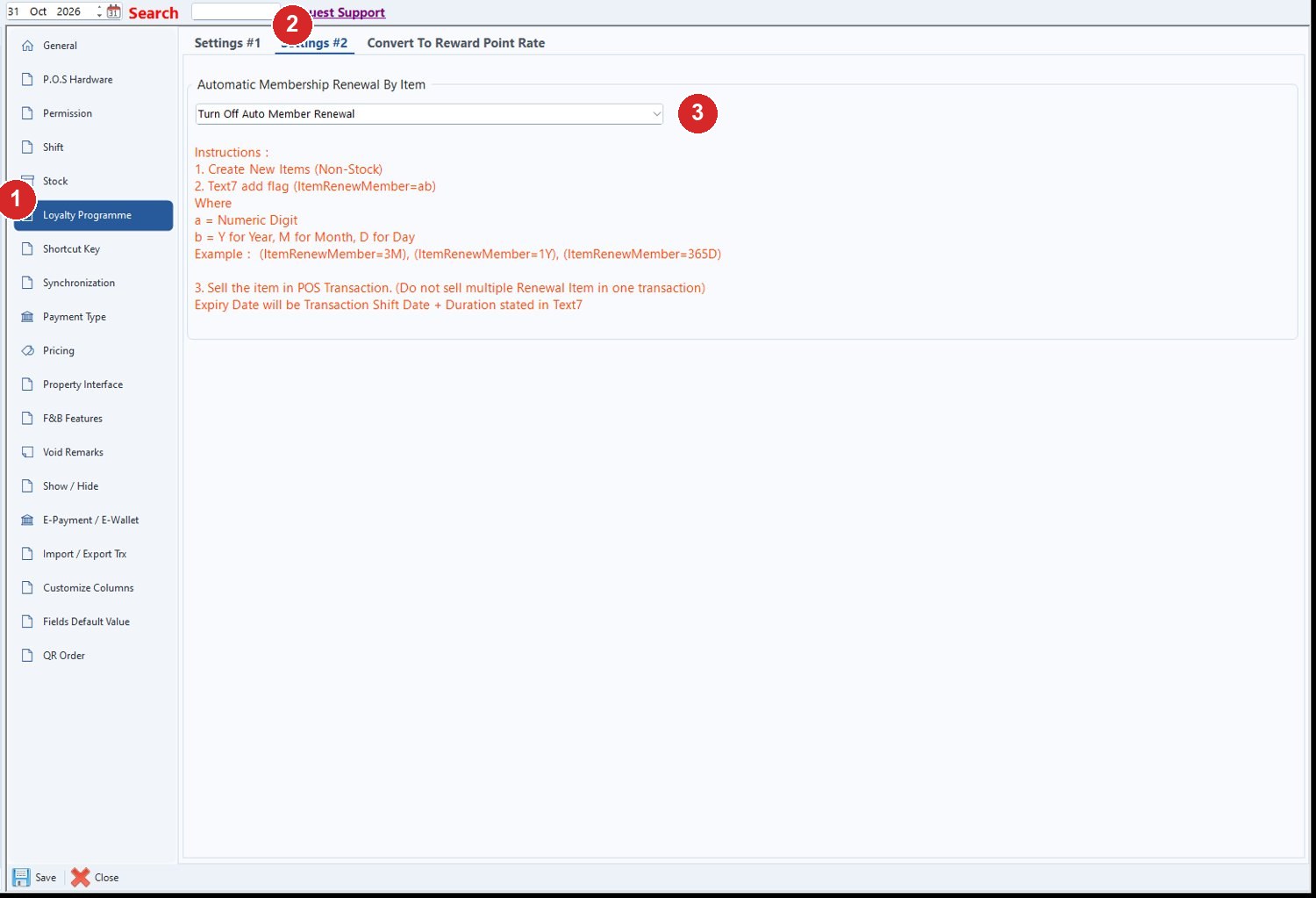
| Step | What to do |
|---|---|
| 1 | Open Loyalty Programme. |
| 2 | Open the Settings #2 tab. |
| 3 | In the Automatic Membership Renewal By Item box choose Turn On Auto Member Renewal (Standalone / No Sync) or Turn On Auto Member Renewal (Sync To Cloud). Choose Turn Off Auto Member Renewal to switch it off again. |
4. Save the settings
Save the point of sale settings.
5. Sell the renewal item
In a point of sale transaction, select the member and sell the renewal item. Sell only one renewal item in the transaction.
6. Check the new expiry date
The member’s new Expiry Date is the transaction’s shift date plus the duration written in the item’s Text7.
Tips
- Do not sell more than one renewal item in one transaction, and do not mix a renewal item with other items in the same receipt.
- When automatic renewal is on and the member has already expired, only a renewal item can be sold. A supervisor can override this with Override Expired Member.
- The duration must end with Y, M or D and the number must be more than zero.
Common problems
Membership already expired. Only Member Renewal Item allowed.
Sell the renewal item to this member first, or ask a supervisor to override the expired member.
Membership Renewal Item cannot mix with other items in Single Receipt.
Sell the renewal item in a receipt of its own.
Invalid Renewal Duration. Please check Item Masterfile.
Open the item and check the flag in Text7. It must look like (ItemRenewMember=3M), with a number and then Y, M or D.
The program says some transactions are pending upload to cloud and asks you to make sure all transactions are uploaded first.
This applies when Sync To Cloud is chosen. Upload the pending transactions first, then sell the renewal item again.