
This guide shows how to record a deposit or partial payment from a customer and knock it off against their invoice. The rest of the invoice stays outstanding. The example records a 300.00 bank transfer from Sample Trading Sdn Bhd against invoice SA2-2610-002 (617.60).
Before you start
- Know whether the payer is a debtor (customer), a creditor (supplier) or a walk-in.
- Know how they paid: cash, cheque, card or bank transfer.
- Have the amount received and the bank account ready.
Steps
1. Open Bank Receipt
Go to Cash Management System > Transactions > Bank > Bank Receipt and add a new record.
2. Choose the debtor
Fill in who paid, into which bank, and how much.
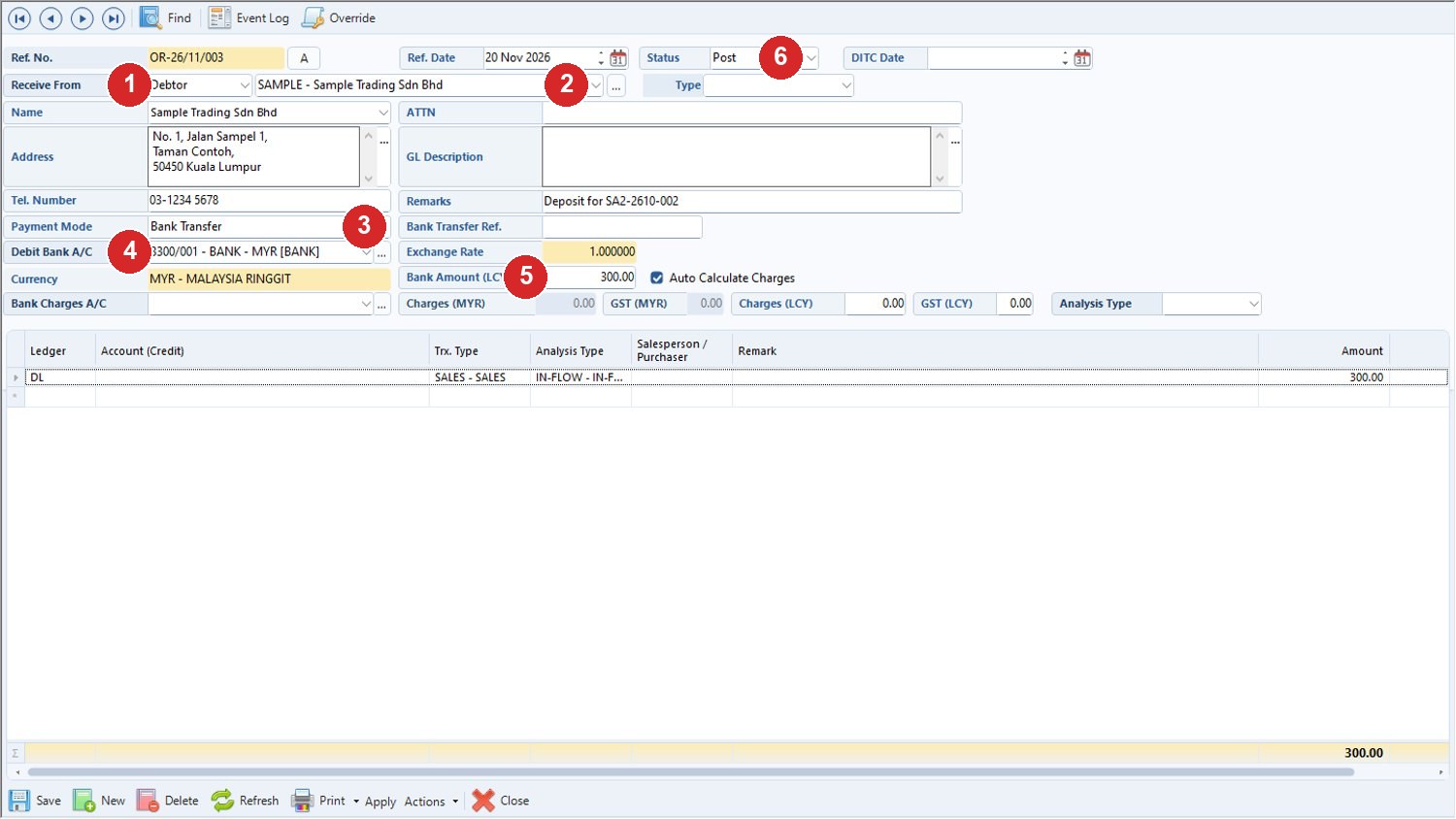
| Step | What to do |
|---|---|
| 1 | Receive From: Debtor. |
| 2 | Pick the debtor in the box next to it (here SAMPLE). Name, address and phone fill in. |
| 3 | Payment Mode (here Bank Transfer). |
| 4 | Debit Bank A/C: the bank account the money went into. |
| 5 | Bank Amount (LCY): the amount received (here 300.00). The DL line amount fills in from it. |
| 6 | Status: Post. Apply only works on a posted receipt. |
3. Choose the bank and payment mode
Choose the bank in Debit Bank A/C and pick the Payment Mode.
4. Enter the amount
Check the amount on the DL line in the grid; it fills in from Bank Amount (LCY).
5. Apply the receipt to the invoice
Click Apply at the bottom of the receipt. The Apply/Knock-Off Invoice window opens.
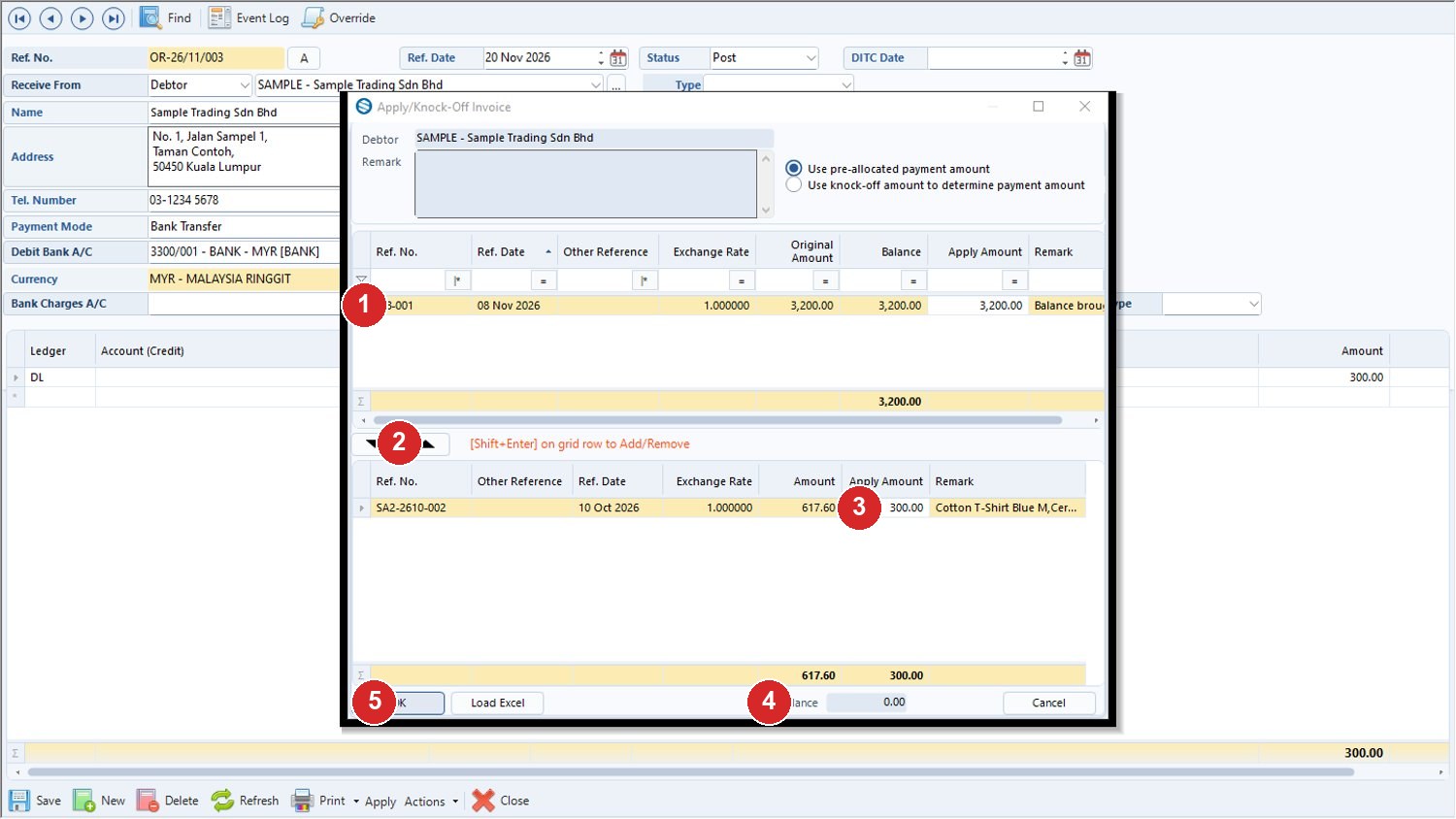
| Step | What to do |
|---|---|
| 1 | The customer’s open invoices are listed on top (here SA2-2610-002, 617.60, and an opening balance). |
| 2 | Select the invoice and click the down arrow (or Shift+Enter) to move it to the bottom list. |
| 3 | Apply Amount: how much of this receipt goes to the invoice (here 300.00). |
| 4 | Balance must be 0.00. |
| 5 | Click OK. |
6. Save
Click Save. The rest of the invoice stays outstanding.
Tips
- All money in goes through Bank Receipt. Journal is only for account adjustments.
- If a customer pays one invoice with two cheques, key in each cheque amount and apply it to the invoice.
- For any excess, decide whether to refund it or keep it for a new invoice.
- For a card sale, select POS Card Clearing as the bank account in the first receipt. When the card settlement reaches your bank, make one more Bank Receipt to clear it.
- For a returned cheque, change the cheque Status to Return.
Common problems
The payment will not save.
Fill in the Currency (Malaysia Ringgit).
The creditor name does not appear in the Receive From list.
Contact Synergy support. Have the payment date, amount and party name ready.
A cheque was already reconciled and then returned.
Key a Bank Payment to the debtor with the same details and post it. Then use Apply Open Credit. To undo a wrong apply, use Reverse Apply and tick only the line to reverse.
You need to put one payment against several debtors.
Contact Synergy support for the exact steps. Have the payment date, amount and party names ready.