
This guide shows how to key in the opening balance of one debtor or creditor. Repeat it for each account that owes you, or that you owe.
Before you start
- The amount, the date and the type (Debit or Credit) for each debtor or creditor
- The exchange rate for the date, if the account uses a foreign currency
Steps
1. Open the Opening Balance screen
Go to Debtor Ledger > Transactions > Opening Balance, or Creditor Ledger > Transactions > Opening Balance.
2. Enter the Ref. No.
With automatic numbering the number box is locked. With manual numbering, type the number yourself.
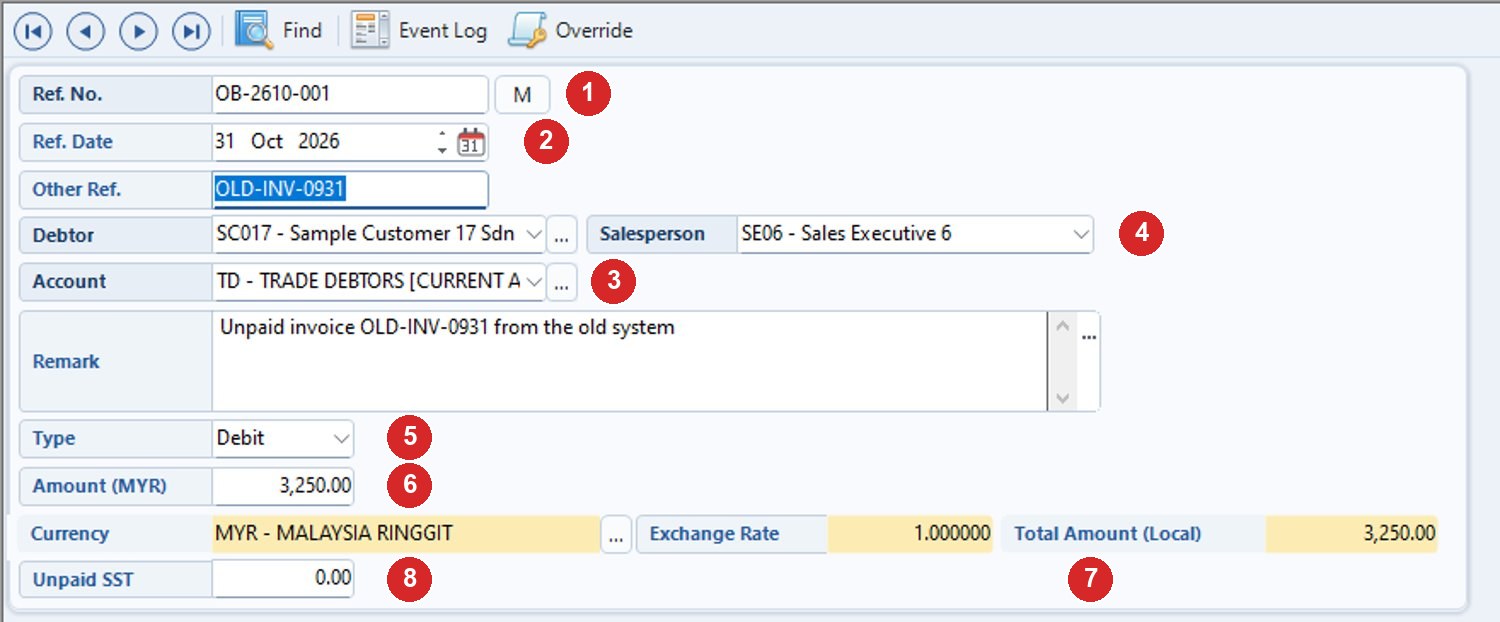
| Step | What to do |
|---|---|
| 1 | Ref. No. |
| 2 | Ref. Date. |
| 3 | Debtor (here SC017); the Account fills in. |
| 4 | Salesperson fills in from the debtor. |
| 5 | Type (Debit). |
| 6 | Amount. |
| 7 | Currency, Exchange Rate and Total Amount (Local). |
| 8 | Unpaid SST (debtors only). |
3. Pick the debtor or creditor
The Account and Salesperson then fill in automatically from the master record.
4. Set the Ref. Date
Changing the date reloads the exchange rate.
5. Check the currency and Exchange Rate
For a local-currency account the rate is 1 and locked. For a foreign-currency account the rate comes from the rate table for the Ref. Date and can be edited.
6. Enter the Amount
Total Amount (Local) is worked out for you and rounded to 2 decimals.
7. Fill in the other fields
Fill in Type, Remark and Other Ref. For a debtor, enter Unpaid SST if needed.
8. Save
Save the record.
Tips
- Amount is always turned into a positive number, so a minus sign is dropped.
- Unpaid SST is for debtor opening debit records only. It must be positive and cannot be greater than the amount.
- If the Amount no longer equals the balance (for example after a payment was applied), the record opens read-only.
Common problems
Amount is required
The amount is 0. Enter a value.
Exchange Rate is required
Check that a rate exists in the rate table for the Ref. Date.
No Currency defined in Debtor/Creditor Masterfile
The debtor or creditor has no currency set. Fix it in the master record.
Cannot edit an existing record
The amount no longer equals the balance, so the record is read-only.