
This guide shows how to set how sales invoices behave: automatic reference numbers, rounding, receipts for cash sales, tax-inclusive pricing and when an invoice can be printed.
Before you start
- You need permission to open the sales and purchases System Settings.
- If you want rounding to the nearest 5 cent, know which account receives the rounding.
Steps
1. Open the Sales Invoice Settings tab
Go to Sales and Purchases > Settings > System Settings.
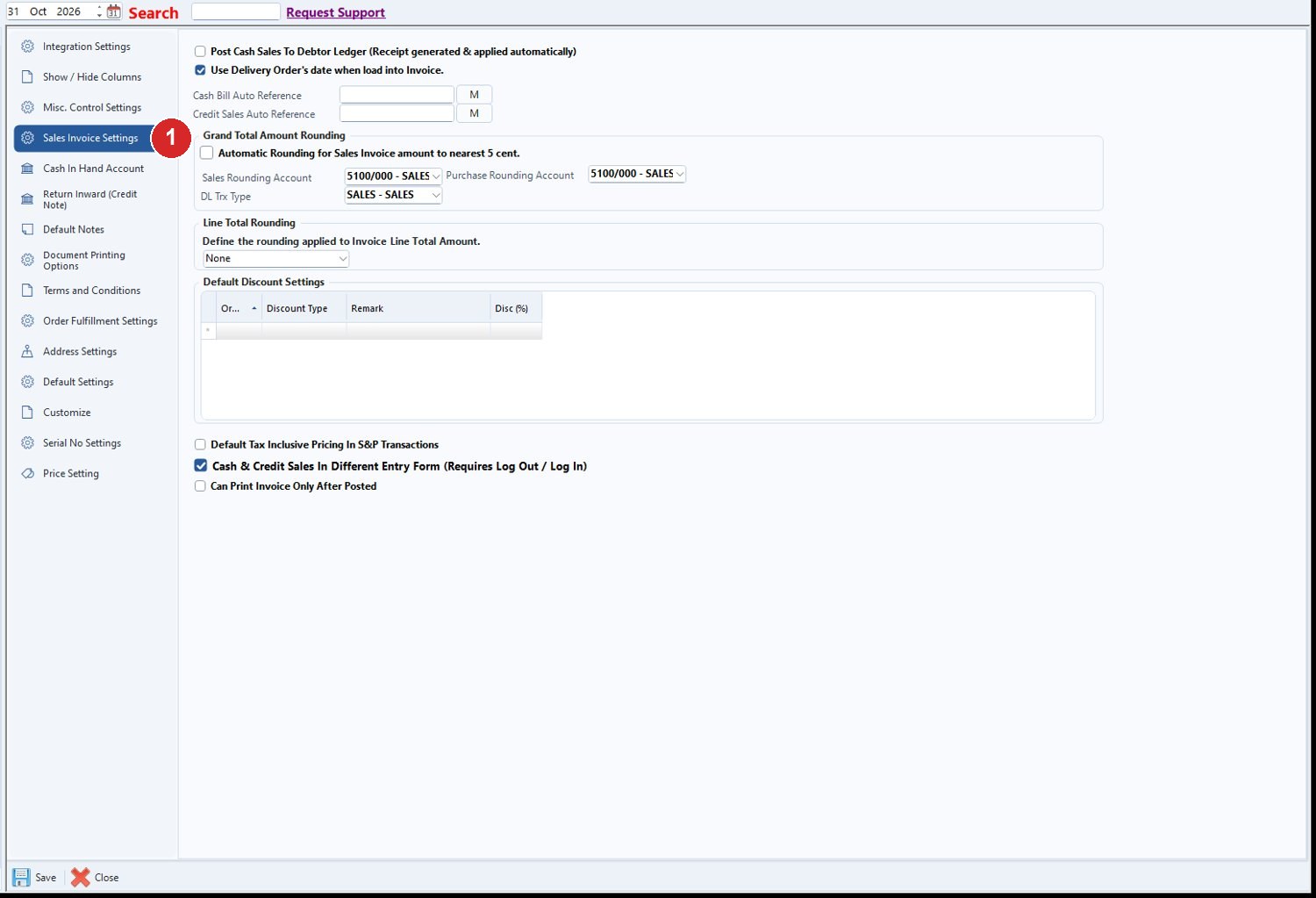
| Step | What to do |
|---|---|
| 1 | Open the Sales Invoice Settings tab. |
2. Set the reference numbers
Set Cash Bill Auto Reference and Credit Sales Auto Reference. They decide how reference numbers are made for cash and credit invoices.
3. Set the grand total rounding
In Grand Total Amount Rounding, tick Automatic Rounding for Sales Invoice amount to nearest 5 cent. if you want it. Then choose the Sales Rounding Account. The Purchase Rounding Account and DL Trx Type are in the same group.
4. Set the line total rounding
In Line Total Rounding, define the rounding applied to the Invoice Line Total Amount.
5. Tick the options you need
Tick Use Delivery Order’s date when load into Invoice., Post Cash Sales To Debtor Ledger (Receipt generated & applied automatically), Default Tax Inclusive Pricing In S&P Transactions, Cash & Credit Sales In Different Entry Form (Requires Log Out / Log In) and Can Print Invoice Only After Posted as needed.
6. Save the settings
Click Save.
Tips
- Post Cash Sales To Debtor Ledger means cash sales get a receipt created and applied for you.
- Cash & Credit Sales In Different Entry Form takes effect only after users log out and log in again.
- Can Print Invoice Only After Posted means an invoice cannot be printed until it is posted.
- The wording printed on the invoice is set in the guide Document Settings: Terms and Conditions Printed on Each Document.
- For the invoice screen itself, see the guide Sales Invoice: Header, Discount and Totals.
Common problems
[Rounding A/C] is required.
You ticked the automatic rounding box but did not choose a Sales Rounding Account. Choose the account and save again.
Users cannot print an invoice
Can Print Invoice Only After Posted is probably ticked. Post the invoice first, or untick the option if that is not wanted.