
This guide shows how to post your monthly consolidated e-invoice and submit it to LHDN. Do it in the first 7 days of the month after your sales.
Before you start
- Post your sales invoices first.
- Know which month the sales are for. For example, July sales are posted in August.
- Make sure earlier months were fully submitted. Pending counts can include earlier years.
Steps
1. Wait for the right time
Wait until the following month starts and finish within its first 7 days. Posting earlier is refused unless Allow Post Consolidated E-Invoice before month-end. is ticked on the Settings tab.
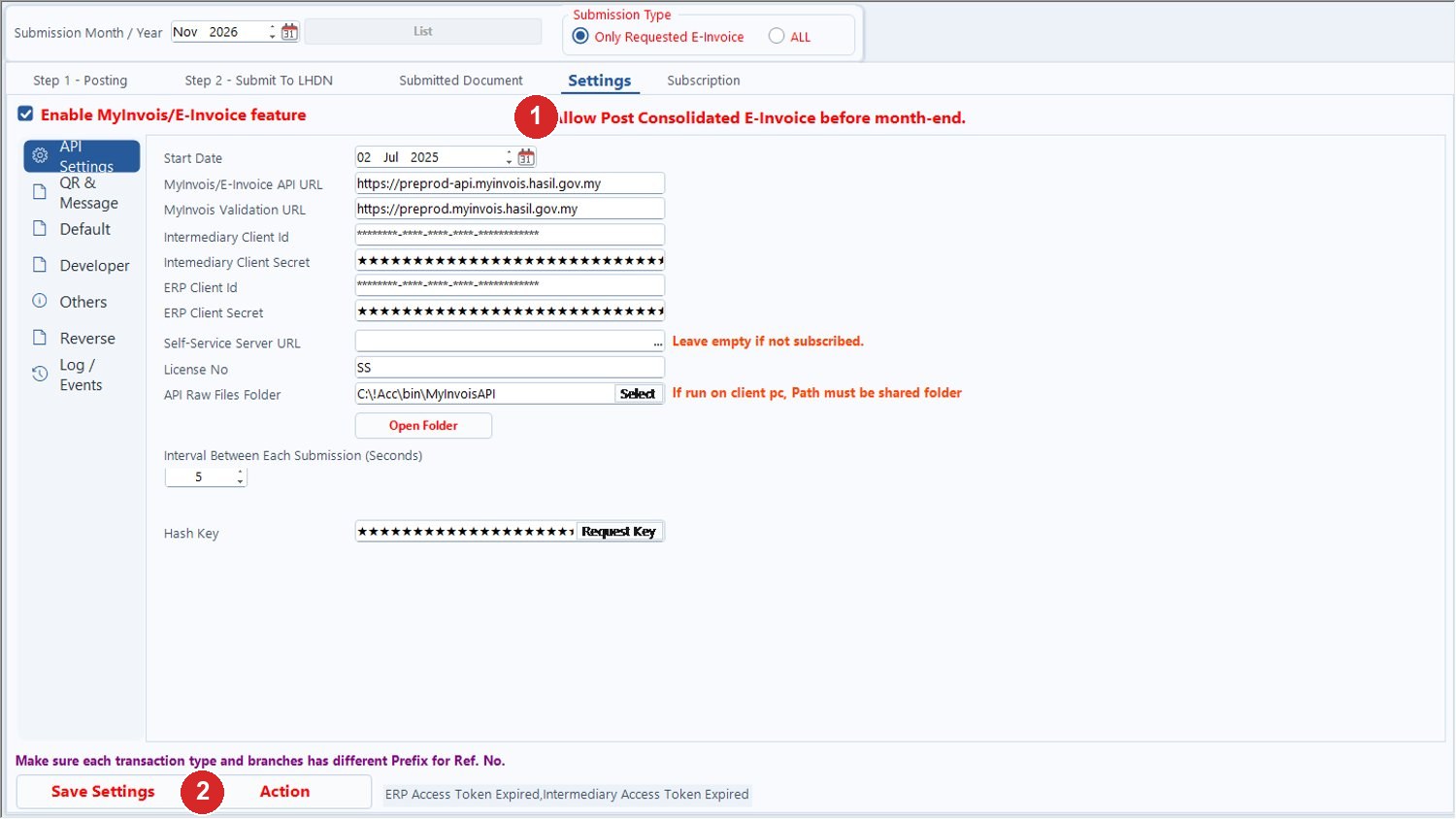
| Step | What to do |
|---|---|
| 1 | Allow Post Consolidated E-Invoice before month-end. (Settings tab) allows posting before the month ends. |
| 2 | Save Settings after changing it. |
2. Open the submission screen
Go to Main > MyInvois / E-Invoice > MyInvois / E-Invoice Submission.
3. List the pending documents
On Step 1 – Posting, choose the Submission Month / Year. Choose the Submission Type (ALL or Only Requested E-Invoice). Click List Pending Documents and check the documents.
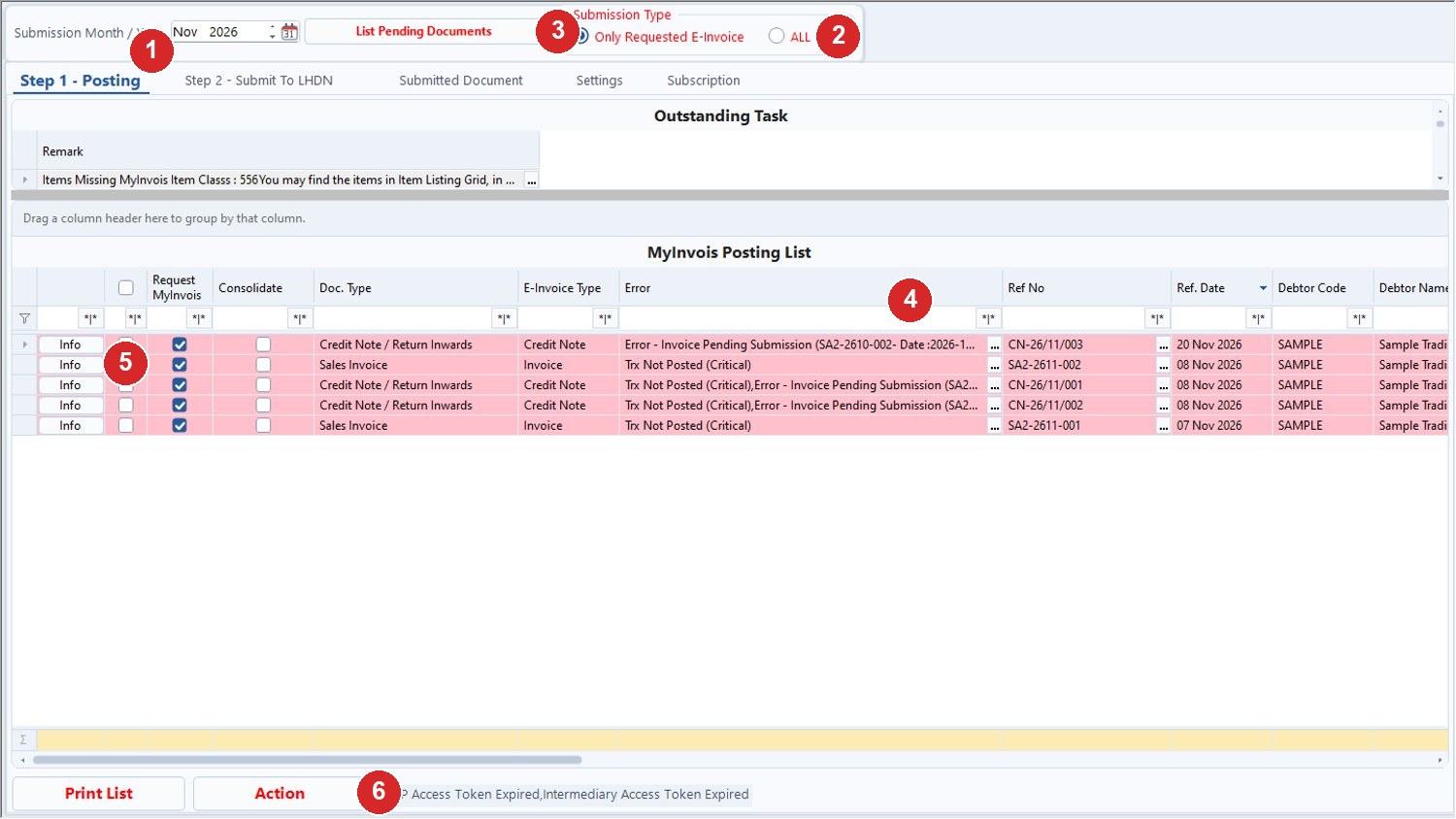
| Step | What to do |
|---|---|
| 1 | Submission Month / Year. |
| 2 | Submission Type: ALL or Only Requested E-Invoice. |
| 3 | Click List Pending Documents. Outstanding Task at the top lists data to fix first (here items missing a MyInvois item class). |
| 4 | Error column: what is wrong with each document (pink rows), for example Trx Not Posted (Critical). |
| 5 | Tick the documents to post. |
| 6 | Action: post the selected documents (or post and submit in one go). |
4. Post the documents
Click Action and choose Post Consolidated E-Invoice. For bills the customer requested, choose Post Selected Requested E-Invoice.
5. Fix any problems
Read the Error column for each document, for example Missing TIN or Exceeded 72 hours window. If a bill cannot be consolidated, it is flagged Request MyInvois. Click the Info button at the left of the row, untick Request E-Invoice in the Update Information window, click Save, then try again.
6. Submit to LHDN
Go to Step 2 – Submit To LHDN and click List Posted Documents. Tick the documents, then click Action > Submit Selected Documents. Confirm when asked.
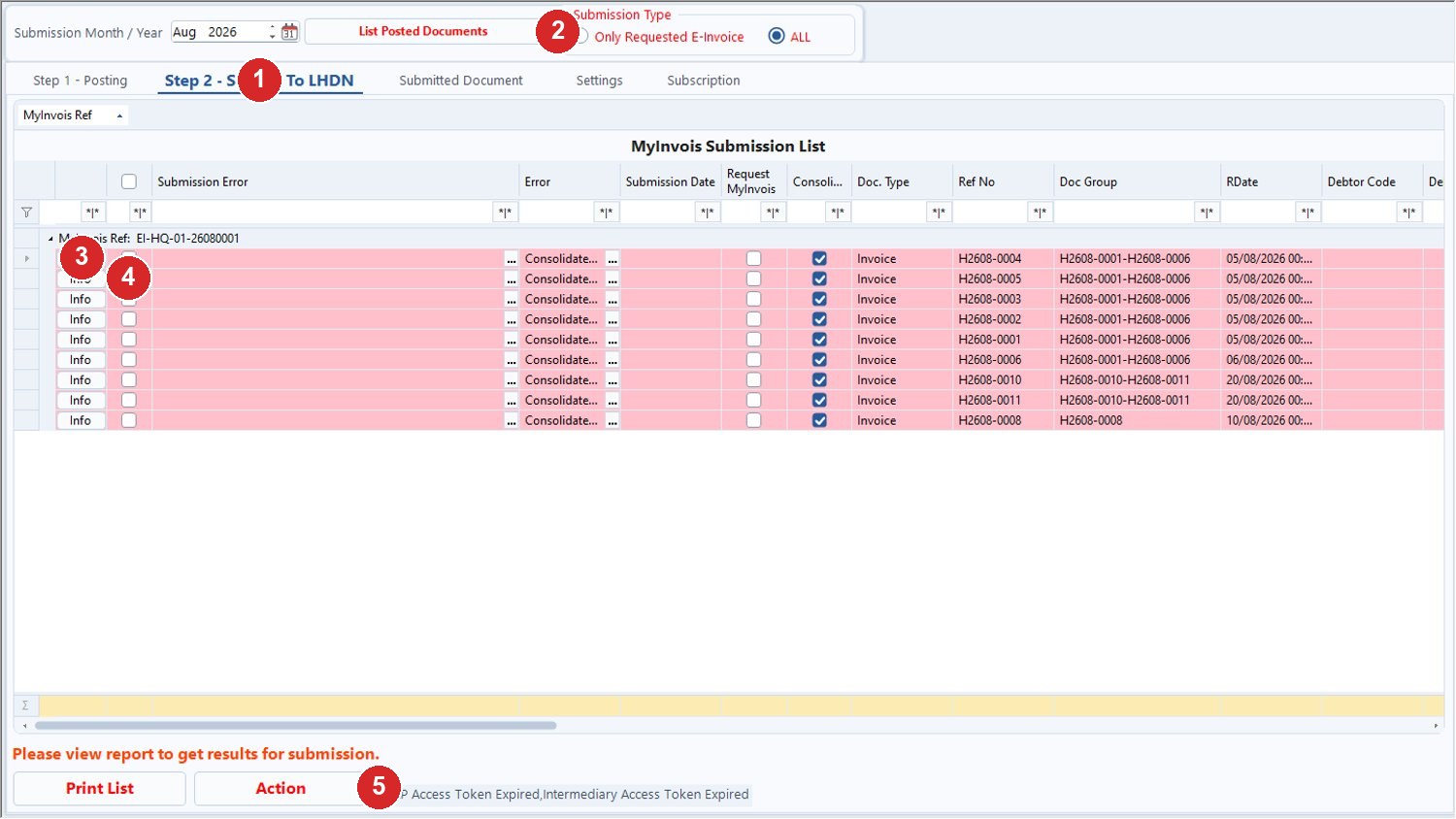
| Step | What to do |
|---|---|
| 1 | Step 2 – Submit To LHDN tab. |
| 2 | Click List Posted Documents. Consolidated bills are grouped under their MyInvois Ref (here EI-HQ-01-26080001). |
| 3 | Info opens the document’s buyer details to read or fix. |
| 4 | Tick the documents to send. |
| 5 | Action > Submit Selected Documents (Reverse Posting is also here). |
7. Or post and send in one go
In Step 1 you can use Action > Post & Submit Consolidated E-Invoice instead. Confirm when asked.
8. Check what was sent
Open the Submitted Document tab to review what was sent. If the consolidated is already submitted and Valid, ignore the Consolidate Reminder.
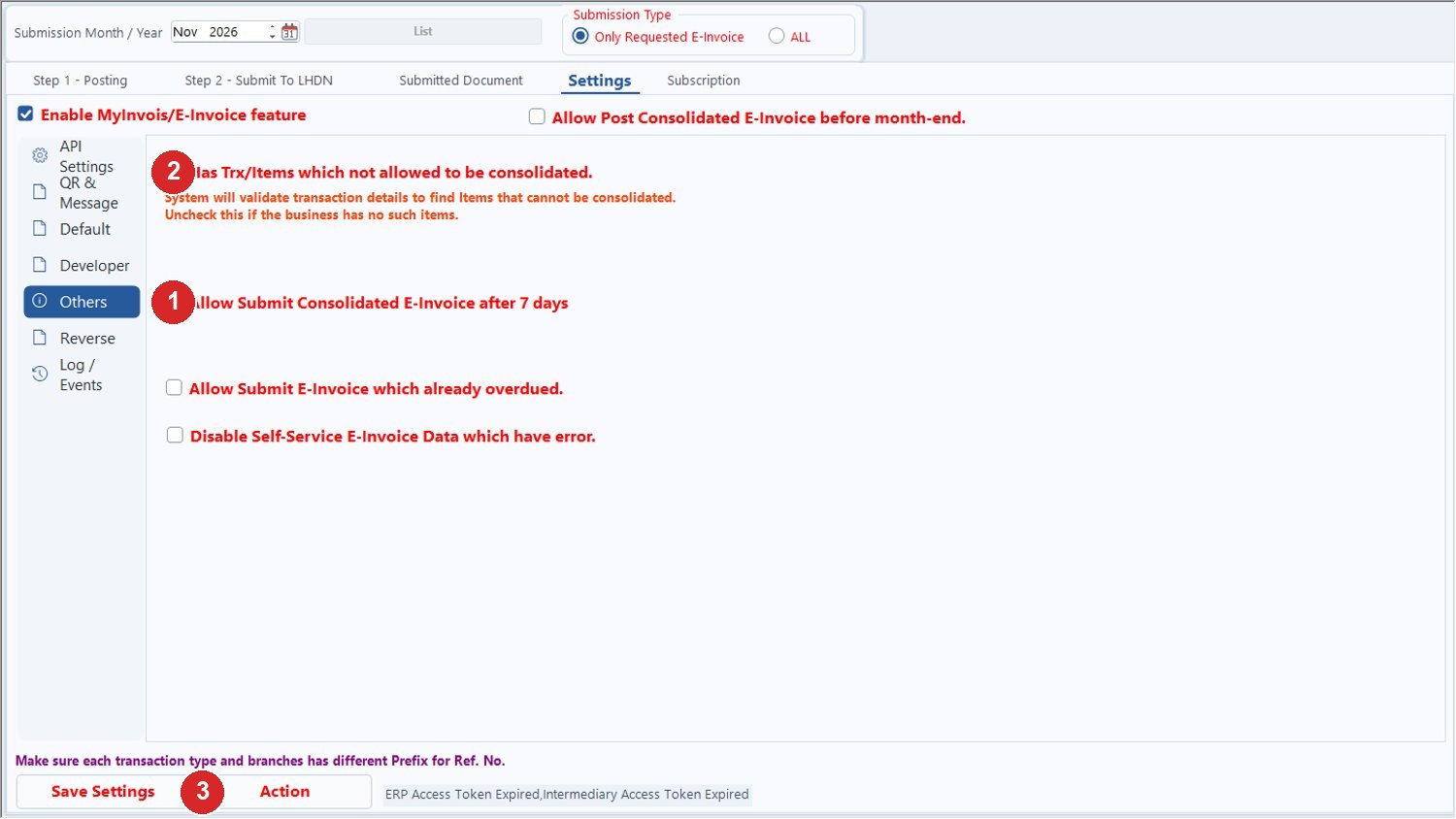
| Step | What to do |
|---|---|
| 1 | Allow Submit Consolidated E-Invoice after 7 days (Others tab) if you missed the first 7 days. |
| 2 | Has Trx/Items which not allowed to be consolidated: the system checks for such items; untick it if your business has none. |
| 3 | Save Settings. |
Tips
- Walk-in customers without a TIN need no e-invoice fields. The consolidated goes out as General. Entering the general TIN is optional.
- If a customer needs an individual e-invoice, mark the invoice as Requested before submitting and submit it within the same month.
- A month already submitted as consolidated cannot be changed.
- Do not submit supplier documents (debit or credit notes). Do not submit a credit note for an invoice that was never submitted, for example from last year. Leave it unticked.
- Bills over RM10,000 must be issued as a Requested e-invoice under the LHDN rule. You cannot switch this off.
- If the 7 days have passed, you can tick Allow Submit Consolidated E-Invoice after 7 days (Settings tab, Others sub-tab). The program warns that LHDN does not allow this and may penalise, so get LHDN permission first.
Common problems
Cannot submit a bill as consolidated.
Check whether it is flagged Request MyInvois. If so, click Info, untick Request E-Invoice, Save and try again.
Posting is refused before month-end.
Wait until the next month starts, or tick Allow Post Consolidated E-Invoice before month-end. on the Settings tab.
I missed the first 7 days.
Get LHDN permission first, then tick Allow Submit Consolidated E-Invoice after 7 days on the Settings tab, Others sub-tab.
The Consolidate Reminder shows but I already submitted.
Open Submitted Document. If the consolidated is Valid, ignore the reminder.
The list shows odd documents or a submit error.
Contact Synergy support. Have the month, a screenshot of the list and the error text ready.
A big bill must be a Requested e-invoice.
Bills over RM10,000 must be Requested under the LHDN rule and this cannot be turned off. If still unclear, contact Synergy support with the bill number ready.