
Use this guide when the program says an e-invoice is late or overdue, when you missed a month, or when you wonder if you may back-date or future-date an invoice and still submit it. Work through the checks in order.
Before you start
- Which month the documents are from, and today’s date.
- Whether they are requested or consolidated e-invoices.
- The exact error text and your software version.
Steps
1. Check the deadline
A requested e-invoice must be submitted within the same calendar month. The system allows a short grace of about 3 days into the next month. After that you see an error such as Exceeded 7 days window for submission or Exceeded 72 hours window for submission. A consolidated e-invoice is submitted in the first 7 days of the following month.
2. Submit the outstanding Step 2 items first
Open Step 2 – Submit To LHDN and submit anything still waiting there before you continue.
3. Allow late submission
Go to the Settings tab and open the Others sub-tab. Tick one or both of the options below, as needed. For consolidated e-invoices the program warns that LHDN does not allow this and may penalise, so get LHDN permission first.
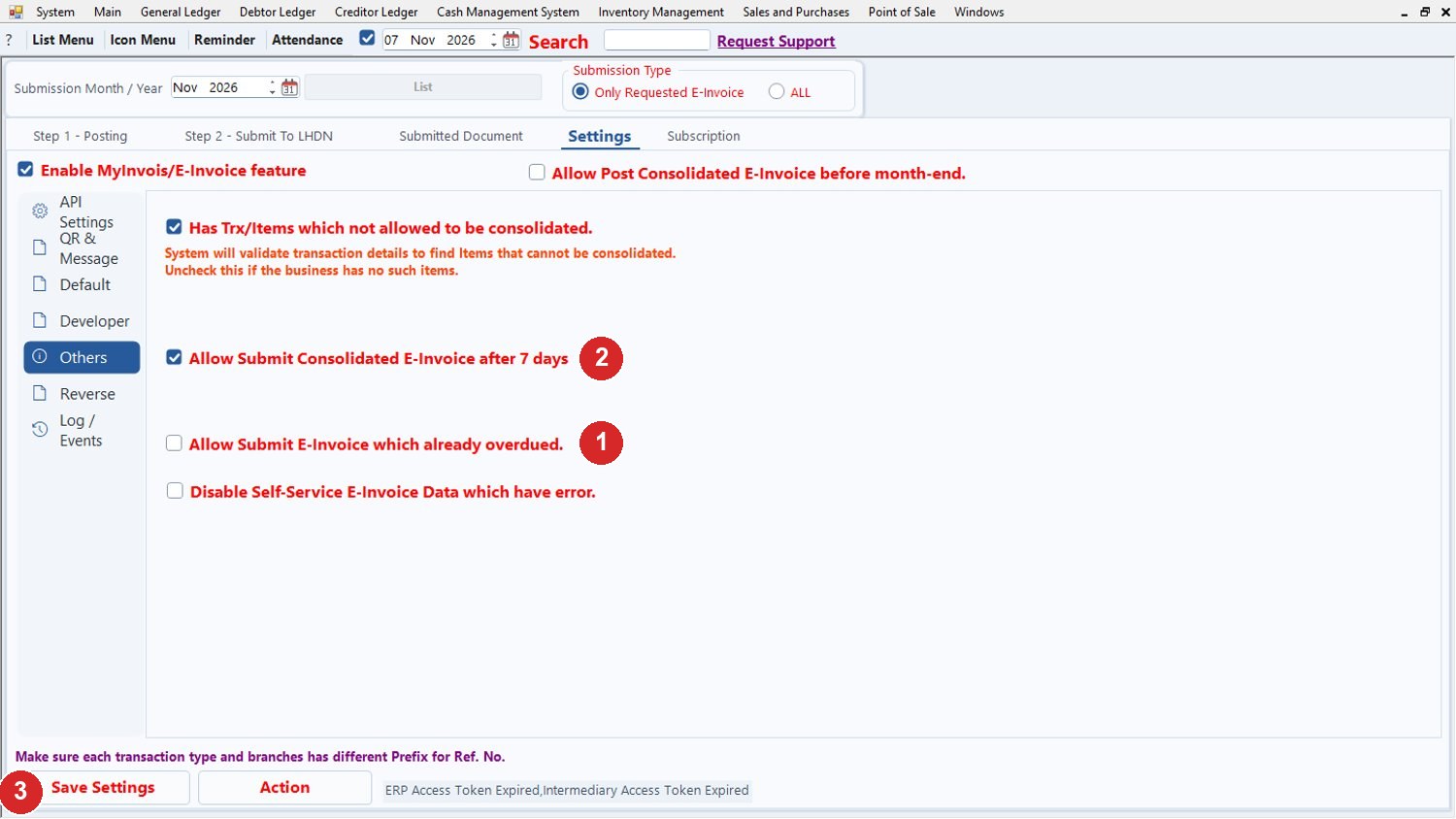
| Step | What to do |
|---|---|
| 1 | Tick Allow Submit E-Invoice which already overdued. for requested e-invoices. |
| 2 | Tick Allow Submit Consolidated E-Invoice after 7 days for consolidated ones. |
| 3 | Enter the confirmation code and save with Save Settings. |
4. Submit again
Submit the documents again. If some documents are overdue, you are asked whether to submit them under the Special Voluntary Disclosure Programme (SVDP).
5. Tick all documents and validate
In Submitted Document, tick all documents and validate until the status changes from Submitted to Valid. Documents stay Submitted if some rows were not ticked. Read the guide “Synergy Acc2026 – E-Invoice Stays Submitted and Does Not Become Valid” if they still do not change.
6. Check the country, .NET 6 and the software version
The country must be MYS. If the program asks you to install .NET 6, install it. If it still fails, update the software.
7. Back-dated or future-dated invoices
You can change the invoice date. What matters is that the details are correct; back-dating has no effect. The customer gets nothing until the invoice is submitted. You can add items to a future-dated invoice until you are ready to submit. After submission it cannot be edited. The easiest way is to submit it as a Requested E-Invoice.
8. An invoice dated before it was created
For example, an invoice dated 1 July that was created earlier is technically possible, but the validation date will then be earlier than the invoice date. Ask Synergy support to confirm before you rely on it.
Tips
- Do not rely on the late-submission options regularly, because LHDN may impose a penalty.
- The late-submission options are under Settings > Others and need a confirmation code to save.
- A credit note that goes with consolidated e-invoices must be submitted as consolidated.
Common problems
July and August were not submitted. Can I submit them in September?
Yes, follow the steps above: tick the late-submission options on the Settings tab, Others sub-tab, enter the confirmation code, submit and validate. Be aware that LHDN may penalise late submission.
Will there be a penalty for a late e-invoice?
LHDN may impose a penalty, so do not rely on the late-submission options regularly.
Documents stay Submitted after I submit them late.
Tick all the rows before you validate. Also check that Step 2 has nothing left.
The error is still there.
Contact Synergy support. Have ready the document numbers, the month, a screenshot of the error and your software version.