
You ran a purge of POS transactions up to a date, but records before that date still appear. This guide lists what to check.
Before you start
- Do not purge again until you have read this guide. A purge cannot be undone.
Steps
1. Check the purge date
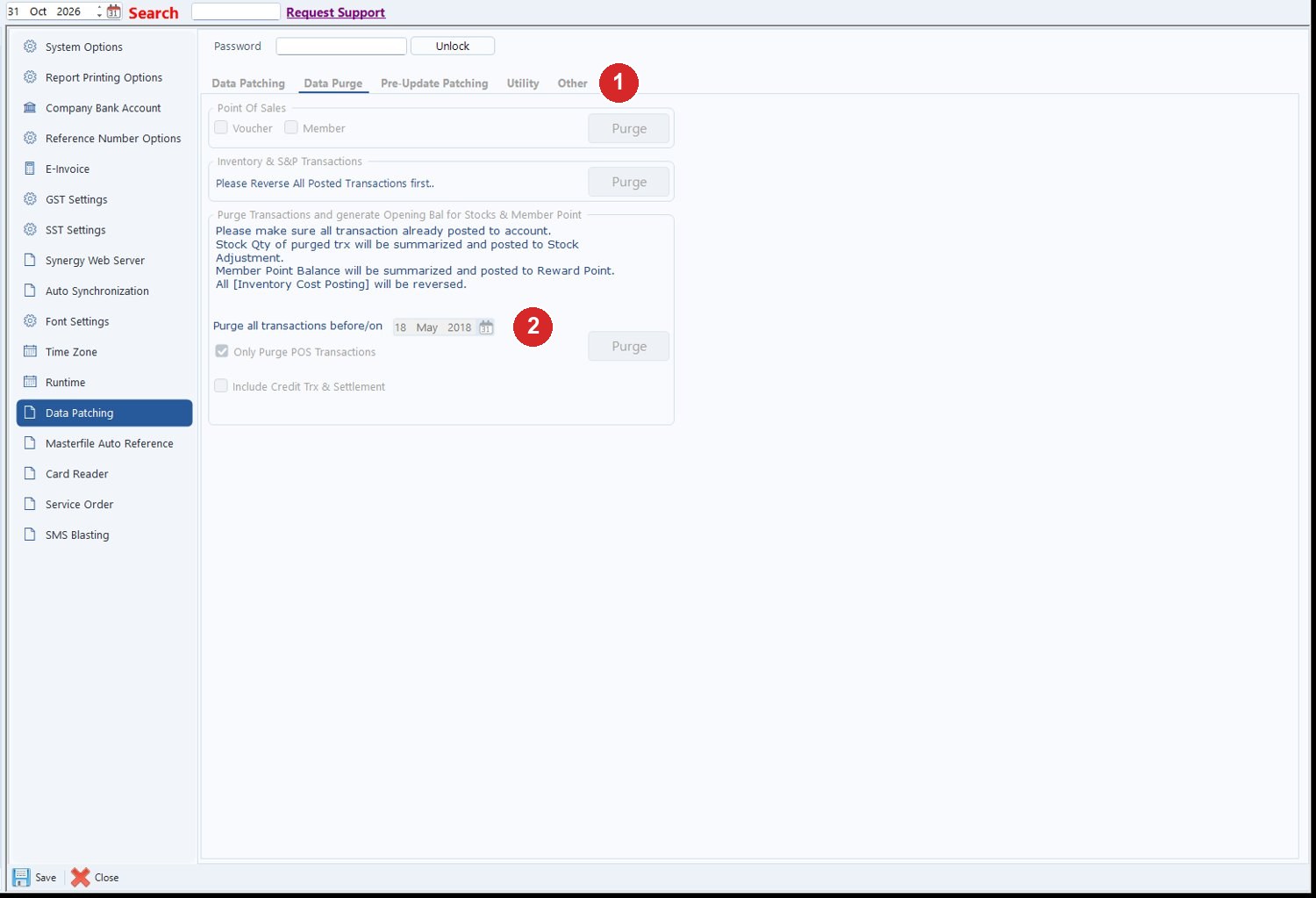
The purge is run from Main > System > System Settings (Main).
| Step | What to do |
|---|---|
| 1 | Open the Data Purge tab. |
| 2 | Check that the purge date you chose was correct. |
2. Check the purge finished
Make sure the purge finished with no error message.
3. Check available disk space
Make sure the disk has enough available space, because the LDF file grows during a purge.
4. Check the two tick boxes
‘Only Purge POS Transactions’ leaves sales and purchase documents in place. Unless ‘Include Credit Trx & Settlement’ is ticked, credit transactions and their settlements are not purged. This is a common reason old records still show.
5. Check everything was posted
Make sure every transaction up to the purge date has already been posted to the accounts before you purge.
Tips
- Before any purge, take a full database backup and do a trial purge on a copy of the database.
- The purge turns the stock quantity into an opening balance (Stock Adjustment) and the member points into Reward Point.
Common problems
Records are still there after checking everything
Contact Synergy support and tell them the purge date and which tick boxes were ticked.