
This guide shows how to set up a recurring transaction type, enter a general ledger journal, and where to record commission, foreign exchange gain or loss and closing stock.
Before you start
- Have your reference number and date ready for the journal.
- Know which accounts to debit and credit. Total debit must equal total credit.
- If the entry will be a recurring one, set up the recurring type first (Steps 1 to 5).
Steps
1. Open Recurring Transaction Type
Go to General Ledger > Transactions > Recurring Transactions > Recurring Transaction Type. Skip Steps 1 to 5 if you are not entering a recurring entry.
2. Add the recurring type
Category is also used as the name of the record. Click Save.

| Step | What to do |
|---|---|
| 1 | Category (here Office rent). Active is ticked automatically. |
| 2 | Type: a description (here Monthly rent for the HQ office). |
3. Open the journal screen
Go to General Ledger > Transactions > Journal. For other entry types, use Petty Cash, Payment or Receipt in the same menu. For a recurring entry, use General Ledger > Transactions > Recurring Transactions > Recurring Transaction.
4. Enter the journal
Here JN-26/11/001 accrues the November accounting fee: debit 9A03/000 ACCOUNTING FEES 500.00, credit 4100/000 OTHER CREDITOR 500.00.
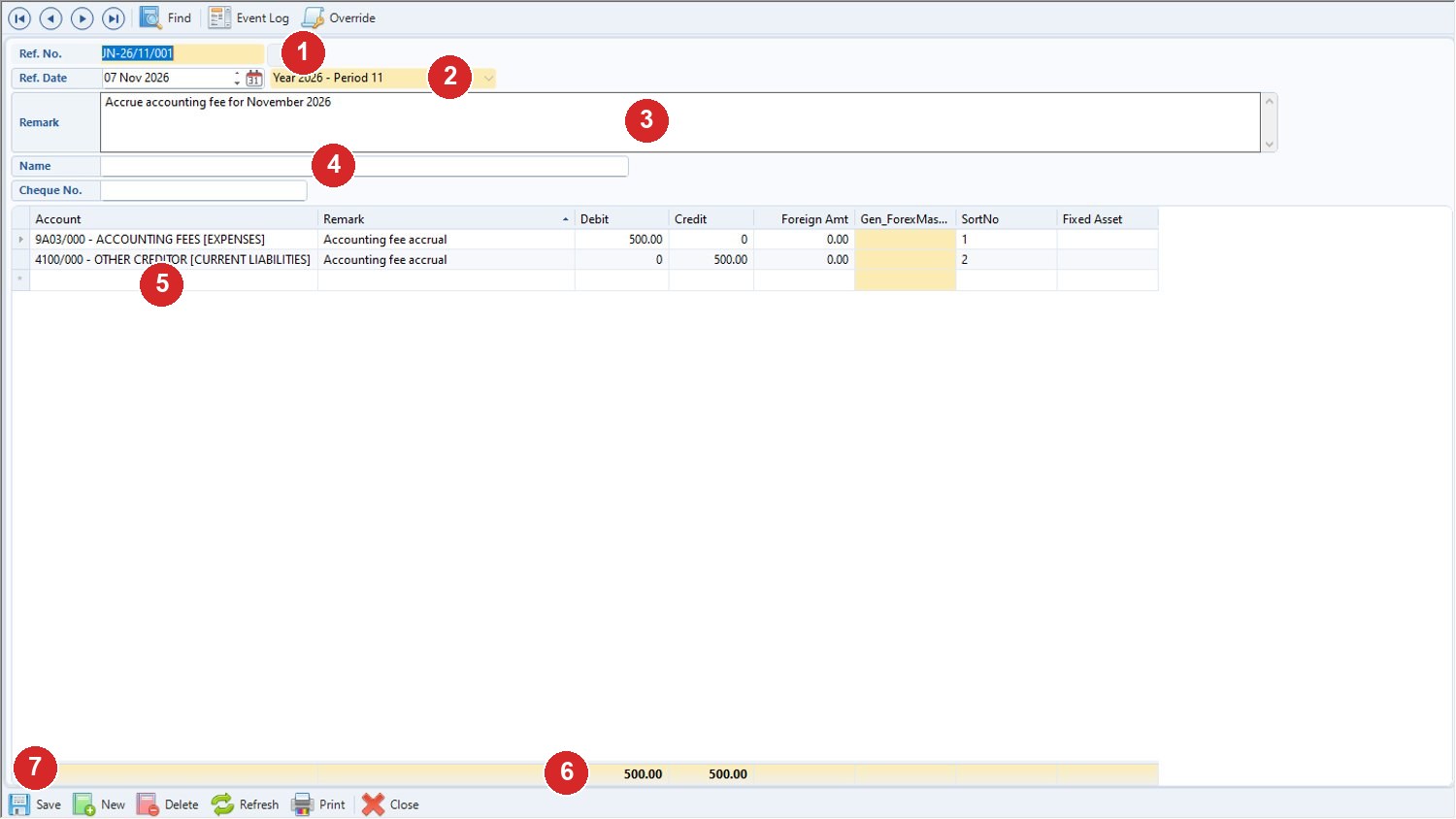
| Step | What to do |
|---|---|
| 1 | Ref. No. (A = automatic). |
| 2 | Ref. Date. The Financial Period next to it fills in by itself and cannot be typed over. |
| 3 | Remark. |
| 4 | Name (the payee) and Cheque No. where relevant. |
| 5 | One line per account with a Debit or Credit amount and a line Remark. For a recurring entry, choose the recurring type. |
| 6 | Total Debit must equal total Credit. |
| 7 | Click Save. |
5. Record commission
The system does not calculate commission. Record it with a Payment Voucher using a commission account, like other expenses.
6. Record closing stock
Closing stock can only be keyed in under Chart of Accounts (the closing stock entry). It then appears in the Balance Sheet and P&L. Remove the amount if you do not want it.
Tips
- Foreign exchange gain or loss posts automatically when the bank receipt rate differs from the invoice rate. To view it, go to General Ledger > Query > Transaction Query and filter on the gain/loss foreign exchange rate account.
- For multi-currency bank charges, use the actual rate. The foreign currency and MYR must differ.
- If an inactive recurring type is unticked, it will not show in the recurring type drop-down.
- Load File (Field = Code,Debit,Credit) reads an Excel or CSV file with the columns Code, Debit and Credit. It is not available on posted entries, recurring entries, or when the screen was opened by drill-down.
- Entries dated on or before the transaction lock date (set in the General Ledger System Settings) are stopped. Only an administrator or a user with access to those settings can continue, by ticking the box and clicking OK.
- Whether something is an asset or an expense, or any other treatment not listed here, is a question for your accountant.
Common problems
Entry will not save.
Read the message shown. Most come from a missing reference, account or amount, a date outside every financial period, or an unbalanced entry.
The double entry doesn’t balance.
Make total debit equal total credit.
[Financial Period] is required.
The Ref. Date is not in any defined financial period. Change the date.
No Account Code or no amount specified for one or more rows.
Give every line an account and an amount.
Invalid [Account Code] entered.
The code is not in the account list. Pick it from the list.
Zero [Foreign Amount] detected in the journal.
Click Cancel and correct the amount, or type the 4-digit code shown and click OK if zero is intended.
Foreign Amount is for Foreign Currency Account only.
Remove the foreign amount or change the account.
Please select a Recurring Type.
Choose a recurring type for the recurring entry.
You cannot find the type in the recurring type drop-down.
Open Recurring Transaction Type and check that Active is ticked.
Cannot delete a line (Account already reconciled / Entry cannot be deleted).
The line is marked as already reconciled, so it cannot be deleted.
GL Period Locked. Transaction earlier than [date] is not allowed.
The date is on or before the lock date. Only an administrator or a user with General Ledger System Settings access can tick the box and click OK. Other users should change the date or ask an administrator.