
This guide shows how to load your member list from an Excel or CSV file with the Member Import Utility.
Before you start
- The Membership Import Excel template, filled in with your members
- A database backup
- A header row, and a Member ID column in the file
Steps
1. Prepare the file
Fill in your member list. Keep only the columns you want to import and delete the unused ones, because every column in the file is written to the members, including Opening Point and Active.
2. Take a backup
Back up the database first. If a Member ID already exists, the import updates that member with the values in your file, and the import cannot be reversed.
3. Open Member Import
Go to Point of Sale > Utilities > Member Import Utility.
4. Choose your file
Click Select File and choose the Excel (.xlsx, .xls) or CSV file. Its rows appear in the grid so you can check them.
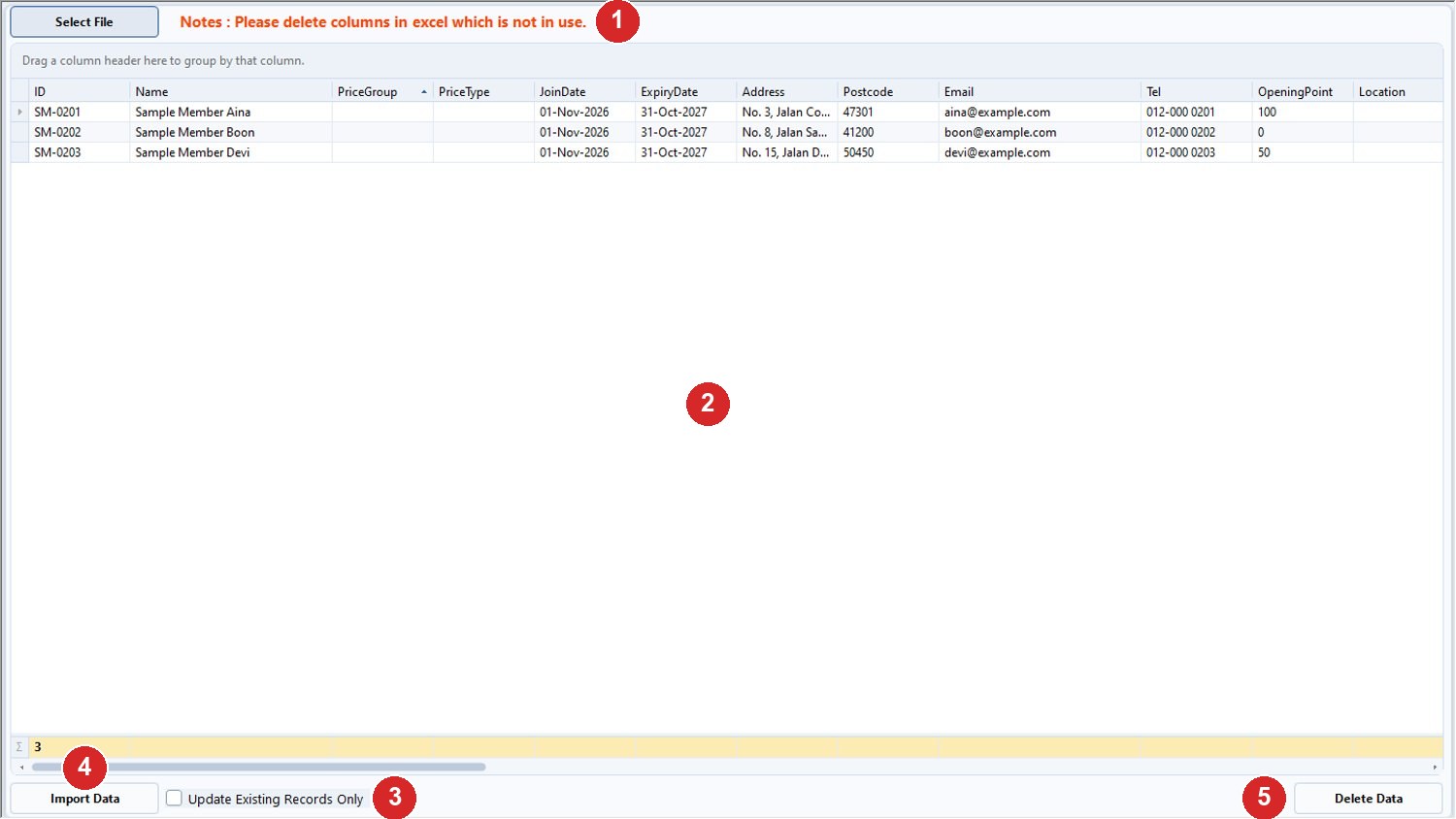
| Step | What to do |
|---|---|
| 1 | Select File (the note: delete unused columns in Excel first). |
| 2 | The rows from the file (here three sample members). |
| 3 | Update Existing Records Only. |
| 4 | Import Data. |
| 5 | Delete Data permanently deletes the members listed in the grid (you must tick the box to confirm). Do not click it to import. |
5. Choose update only if needed
Tick Update Existing Records Only if you do not want new members created.
6. Import
Click Import Data and answer Yes.
Tips
- Recognised headings include Member ID (or Code), Description or Name, Alternative ID, Join Date and Expiry Date, and e-invoice fields such as IsWalkIn, IdType, IdNo, StateCode, MyInvoisAddress, MyInvoisTel, MyInvoisQR, RequestMyInvois and SSTNo. Your own custom field names can also be used as headings.
- Do not click Delete Data unless you really want to delete members. It permanently deletes EVERY member listed in the grid and cannot be undone.
Common problems
Member ID column is required
The file has no Member ID column. Add one.
Nothing appears after selecting the file
Check that the file has a Member ID column.
Need the template or help with point rates
Contact Synergy support.