
Product Assembly records making finished goods from raw materials. You list what you will make, the program works out the materials needed, and posting creates the stock movement.
Before you start
- The finished goods items need their materials defined.
- Know which location holds the raw materials and which location will receive the finished goods.
Steps
1. Fill in the assembly
Go to Inventory Management > Transactions > Stocks > Product Assembly. The finished goods items need their materials defined first. Here JS006 makes 5 x FG1 from RM1 and RM2 (total cost 280.00).
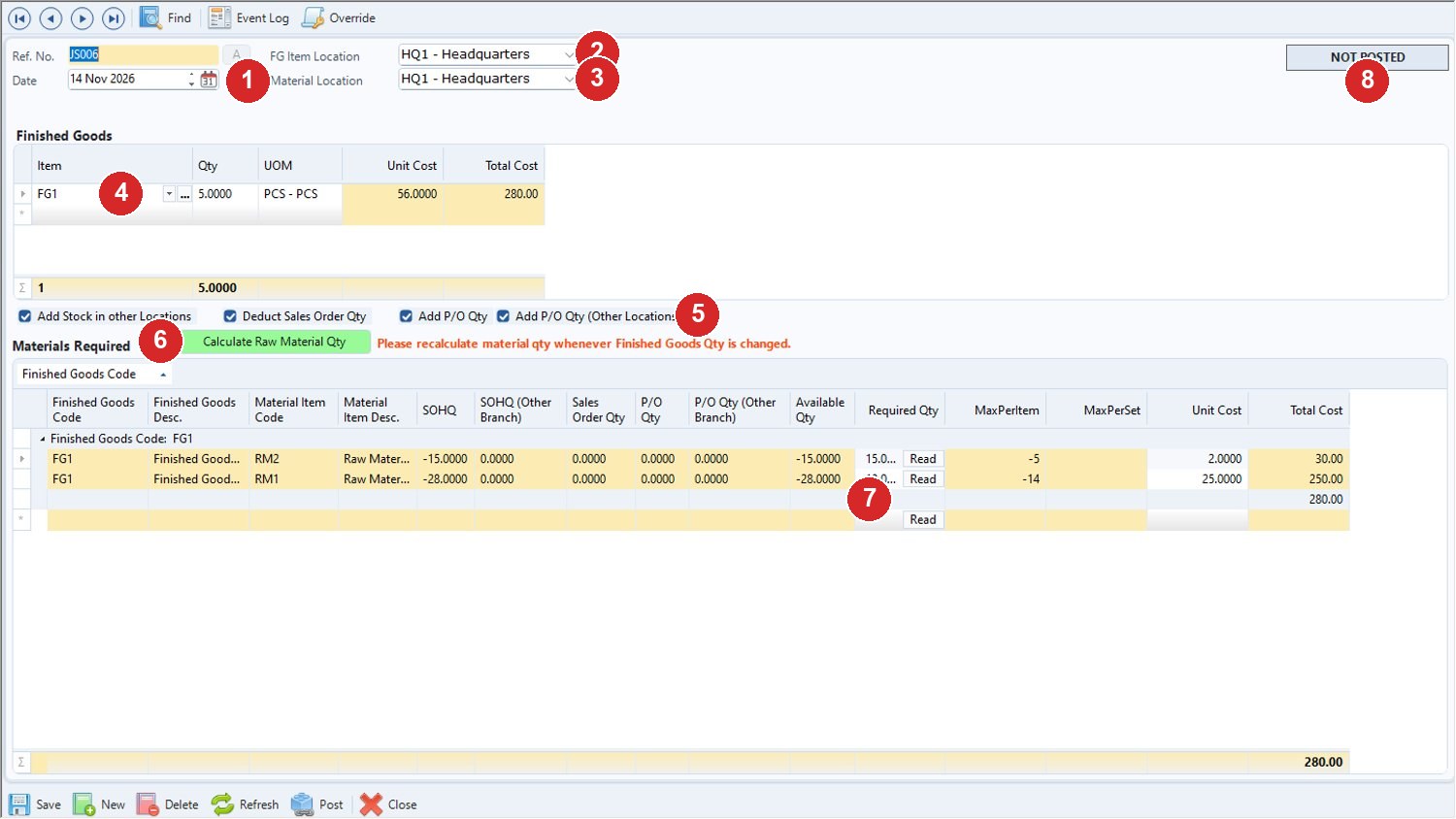
| Step | What to do |
|---|---|
| 1 | Ref. No. and Date. |
| 2 | FG Item Location: where the finished goods go. |
| 3 | Material Location: where the raw materials come from. |
| 4 | Finished Goods: each item to assemble and its Qty. |
| 5 | Tick Add Stock in other Locations, Deduct Sales Order Qty, Add P/O Qty or Add P/O Qty (Other Locations) to count them in Available Qty. |
| 6 | Click Calculate Raw Material Qty. Recalculate whenever the finished goods quantity changes. |
| 7 | Materials Required: change Required Qty if needed; Read takes the weight from a weighing scale when one is set up. |
| 8 | Save, then click Post and answer Yes. The label changes from NOT POSTED to POSTED; Unpost reverses it so you can change the record. |
Tips
- Please recalculate material qty whenever Finished Goods Qty is changed. The calculation is not automatic.
- Posted records cannot be changed. Unpost first.
- The Package and UOM Item report options let you choose Package or Sub Items, and Sales UOM or Conversion UOM Item. Click Set Default to keep your choices. The default is shared, so it changes for everyone who uses that report option.
Common problems
No finished goods selected
Add a finished goods line first.
Material Location is required
Choose the Material Location.
Material quantities look old
Click Calculate Raw Material Qty again after changing a finished goods quantity.
Posting NOT ALLOWED because some changes of the record is not saved yet
Click Save to keep changes or Refresh to abandon them, then click Post again.
Changes not allowed because Transaction already posted
Click Unpost before editing.
The report still shows both package and sub item lines
The report may be built to filter in another way, so those options have no effect on it.