
The Stock Request Query lists the stock requests raised for a location and turns a request into a Stock Transfer, a Purchase Order or a Sales Order. The pending order list shows, for one item, the orders that have not yet been fully delivered or received. This guide covers both.
Before you start
- You need access to the Stock Transfer, Purchase Order or Sales Order screens to convert a request into one of them.
Steps
1. Open the Stock Request Query
Go to Inventory Management > Transactions > Stocks > Stock Request > Stock Request Query.
2. List the requests and convert them
When the screen opens, the range is the last month up to today. The lines are grouped by request date and Ref. No.; use the filter row above the grid to narrow them. Here SHOP’s request SR-2611-001 has 3 Pending lines.
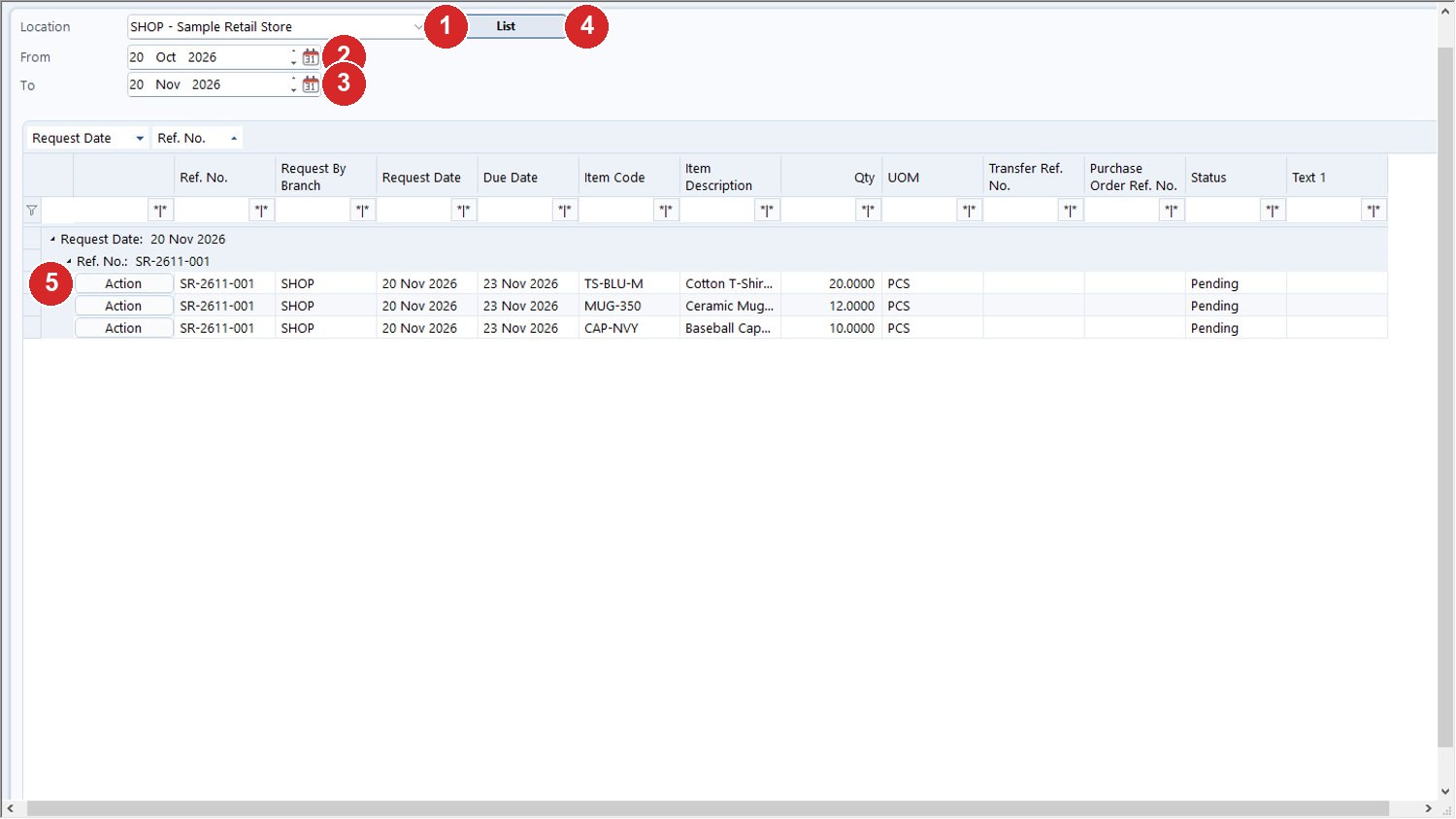
| Step | What to do |
|---|---|
| 1 | Location. |
| 2 | From. |
| 3 | To. |
| 4 | Click List. |
| 5 | Action on a line opens a small window with Convert To Stock Transfer, Convert To Purchase Order and Convert To Sales Order. Pick one and confirm: a new document of that type opens with the request’s items. Its number then shows in the Transfer Ref. No. or Purchase Order Ref. No. column. |
3. Open a document that came from a request
To look at a document that already came from a request, double-click its reference number in the transfer or purchase order column. That document opens for editing.
4. See pending orders for an item
The Sales Order Pending Delivery list is opened for an item from the item record and from transaction screens such as Stock Adjustment, Delivery Order and Purchase Requisition. Read each order line for the quantity ordered, the quantity remaining and the date.
5. Open the original order
Double-click a row in the pending list to open the original document.
Tips
- The Stock Request Query grid does not refresh by itself. Click List again after you change the location or dates.
- Cancelling the action window creates no document.
- For sales orders, the pending list shows Ref. No., Ref. Date, Expected Delivery, S/O Qty, Pending Delivery, UOM, Debtor Code and Debtor Name.
- When the list is opened for purchase orders, it is titled Purchase Order Pending Receipt and shows P/O Qty, Pending Receipt, Creditor Code, Creditor Name and Expected Receipt instead.
Common problems
The Stock Request Query grid is empty.
Widen the date range or change the location, then click List again.
Nothing happens when I double-click a request.
Only the transfer and purchase order reference columns open a document, and only when a document already exists there.
The pending order list is empty.
The item has no outstanding orders.