
Work down this list in order. Each step is a quick check, and names the full guide to read next if the check does not solve the problem.
Before you start
- The invoice number and the month.
- The exact message, from the Step 1 list or from Info in Step 2.
- Your software version.
Steps
1. Is e-invoice set up?
Synergy support sets up the e-invoice setting after you give your ERP Client ID and Secret. On the Settings tab, Enable MyInvois/E-Invoice feature must be ticked. Read the guide “Synergy Acc2026 – Starting E-Invoice (MyInvois)”.
2. Did you do both steps?
Open Main > MyInvois / E-Invoice > MyInvois / E-Invoice Submission. Read the guide “Synergy Acc2026 – Submitting E-Invoices (Step 1 and Step 2)”.
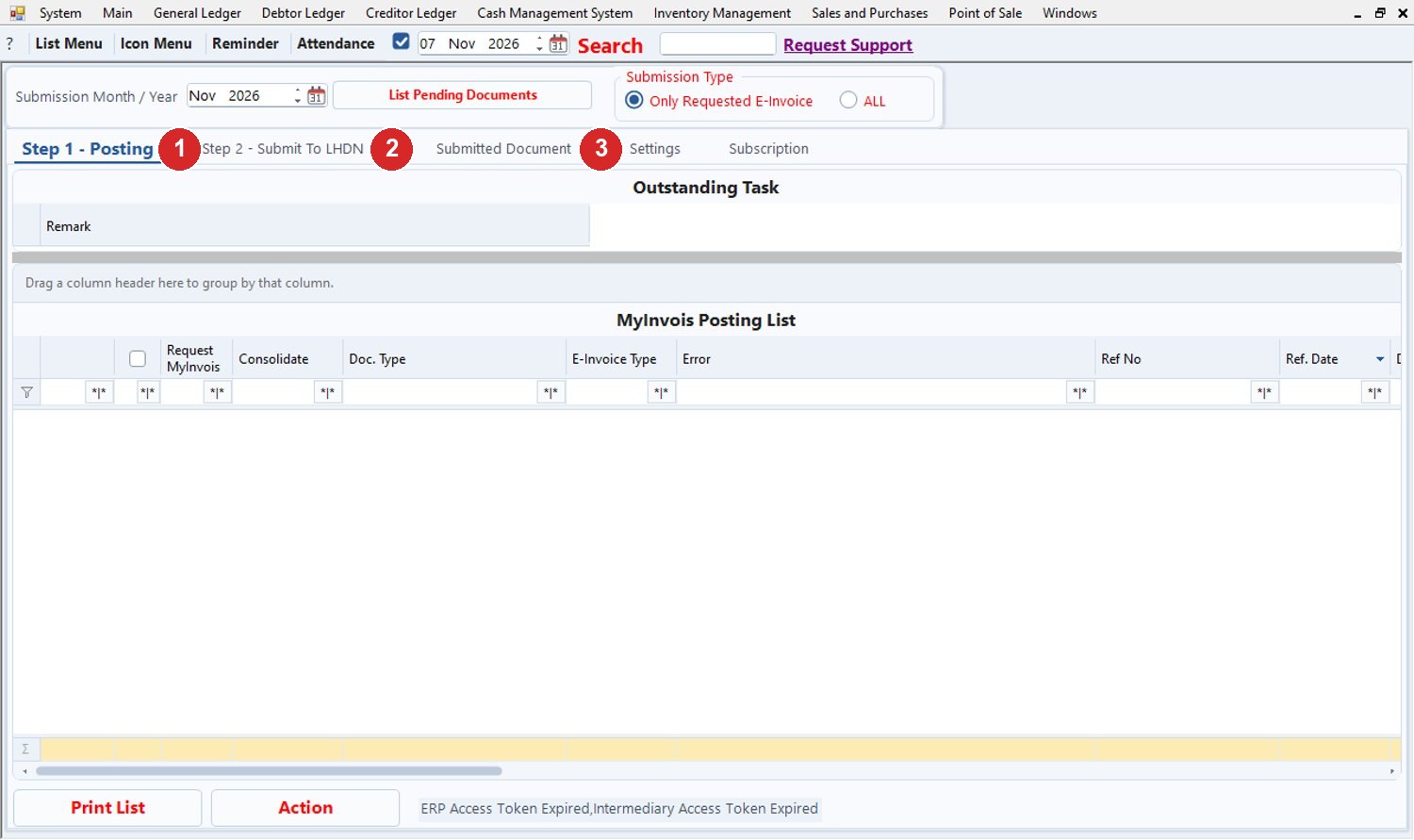
| Step | What to do |
|---|---|
| 1 | Step 1 – Posting posts the documents. |
| 2 | Step 2 – Submit To LHDN sends them. |
| 3 | Then check that every row in Submitted Document is Valid. |
3. Does the program say the licence or contract has expired?
An ended maintenance contract blocks e-invoice and branch upload. Renewal is done through Synergy admin. Read the guide “Synergy Acc2026 – Licence: Changes and Problems”.
4. Is it a token message?
A message such as Intermediary Access Token Expired is usually harmless. Submit again in Step 1 or Step 2, or use Renew Access Token in the Action menu on the Settings tab. Read the guide “Synergy Acc2026 – Submitting E-Invoices (Step 1 and Step 2)”.
5. Does the Step 1 list show red-flag messages?
Read the message, then fix the customer or item data it points to, such as TIN, address, city, postcode, state, phone number, e-mail or MSIC Code. Read the guide “Synergy Acc2026 – E-Invoice Rejected or Invalid: What to Check”.
6. Is the document Invalid or Rejected?
Open Step 2 and press Info on the document to read the error. Rejected documents do not show in the Step 1 pending list. Read the guide “Synergy Acc2026 – E-Invoice Rejected or Invalid: What to Check”.
7. Is it too late to submit?
If the message says Exceeded 7 days or 72 hours window, go to Settings > Others and tick the option that allows overdue submission. You need a confirmation code to save. Read the guide “Synergy Acc2026 – Submitting E-Invoices (Step 1 and Step 2)”.
8. Does it say the Company Name in License and Database is different?
Open Company Information and click Save. Read the guide “Synergy Acc2026 – Submitting E-Invoices (Step 1 and Step 2)”.
9. Is the buyer without a TIN, or does a customer ask for an e-invoice?
A buyer with no TIN who has not asked for an e-invoice goes into the consolidated e-invoice. Read the guides “Synergy Acc2026 – A Customer Asks for an E-Invoice” and “Synergy Acc2026 – Monthly Consolidated E-Invoice”.
10. Was something submitted wrongly?
A submitted invoice cannot be edited. Read the guide “Synergy Acc2026 – Changing or Cancelling an E-Invoice”.
Tips
- If you used only Post, you must still do Step 2 yourself.
- Requested e-invoices are submitted within the same month. Consolidated e-invoices are submitted in the next month.
- Submitted only means the document was sent. Valid means it was accepted.
Common problems
It still does not work.
Contact Synergy support. Have ready the invoice number, the customer record, your software version, a screenshot of the Validation Message or error, and the main PC ready for a remote session.