
Work down this list in order. Each step is a quick check, and names the full guide to read next if the check does not solve the problem.
Before you start
- Whether the slow PC is the main PC or a client PC.
- How much RAM the PC has.
- Whether it is slow all the time, only in the morning, or only on one screen.
Steps
1. How full is the memory?
On the slow PC open Task Manager and look at CPU, RAM and disk. If RAM is near 80 to 90 percent, the software will hang. Read the guide “Synergy Acc2026 – PC Slow, Lagging or Hanging”.
2. Are heavy programs open?
Close programs such as Chrome and WhatsApp, and do not run many programs on the POS PC. The guide “Synergy Acc2026 – PC Slow, Lagging or Hanging” explains this.
3. Does the PC have enough RAM?
A PC with only 4GB should be upgraded. At least 8GB was advised, and 16GB where the memory stayed high all the time. After a RAM upgrade you may need to reinstall the software. Read the guide “Synergy Acc2026 – PC Slow, Lagging or Hanging”.
4. Is it slow only when picking items at the POS?
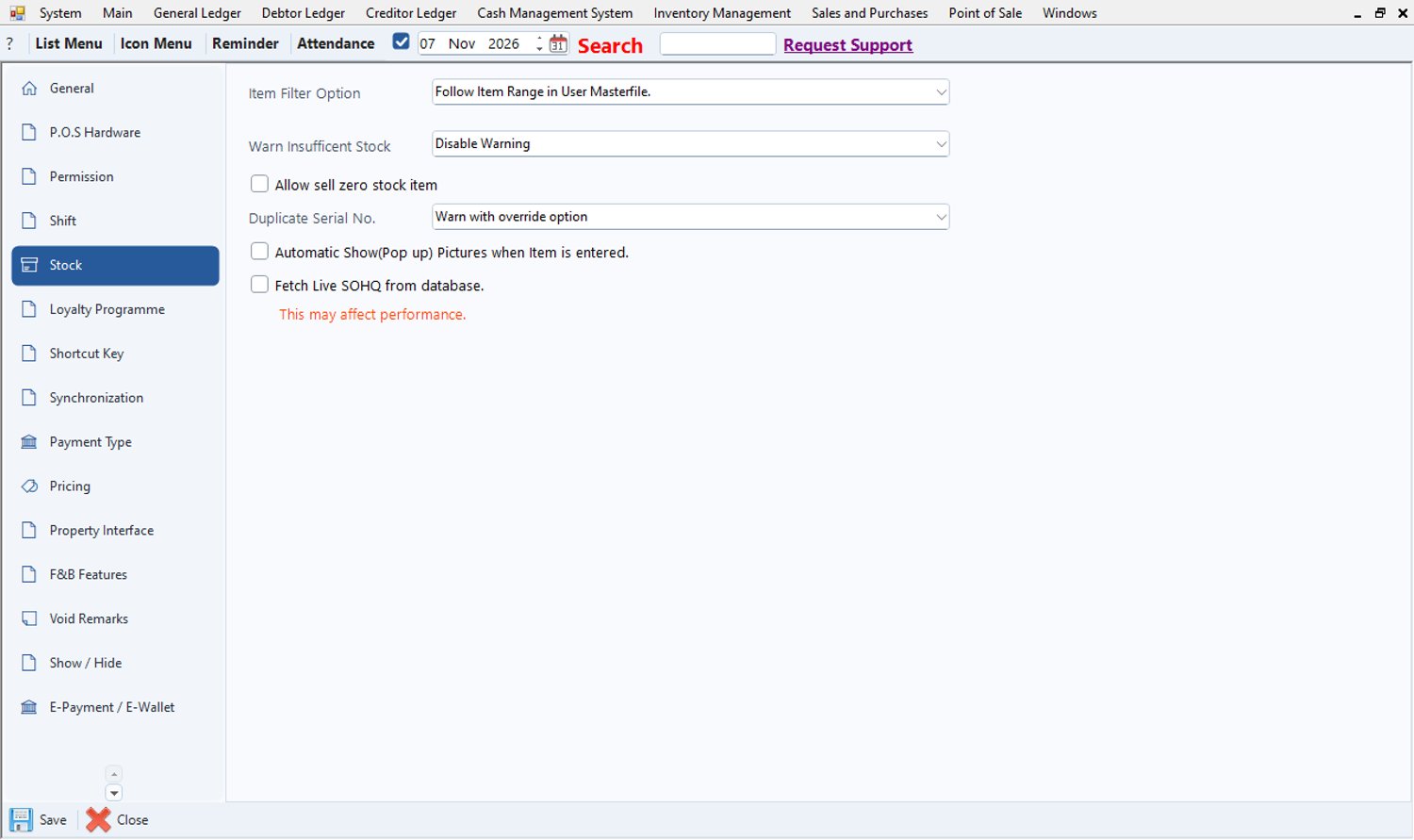
Check whether Fetch Live SOHQ from database is ticked on the Stock tab of the Point of Sale Settings. Untick it if live stock is not needed. Read the guide “Synergy Acc2026 – POS Settings: Stock Behaviour and Shortcut Keys”.
5. Is it slow only first thing in the morning?
The background services may still be starting. Wait a few minutes after switching on the PC. Read the guide “Synergy Acc2026 – Cannot Connect or Cannot Log In: What to Check”.
6. Is only a client PC slow, or does it lose the main PC?
Check the Wi-Fi name, the router and the shared folder. Read the guide “Synergy Acc2026 – IT: Checking the Network and Shared Folder Between the Main PC and Client PCs”.
7. Is the main PC frozen?
Read the guide “Synergy Acc2026 – Main PC Off, Frozen or Will Not Start”. After a power cut also read “Synergy Acc2026 – IT: Checking the Database and Services After a Power Cut”.
8. Is it Windows or Excel and not Synergy?
If letters trigger shortcuts, a Ctrl key may be stuck, so press the left and right Ctrl keys a few times. If Excel is slow, copy only the real data range into a new blank workbook. See the guide “Synergy Acc2026 – Getting Remote Help from Synergy Support”.
Tips
- Common causes are only 4GB of RAM, and a browser and chat apps open at the same time.
- A window that seems gone may only be minimised. Click it in the taskbar to restore it.
Common problems
It still lags after closing programs and with enough RAM.
Contact Synergy support. Have the PC specs and a Task Manager screen ready, and say whether it is the main PC or a client PC.