
Work down this list in order. Each step is a quick check, and names the full guide to read next if the check does not solve the problem.
Before you start
- The name of the report, and the menu you opened it from.
- The date range or period you used.
- The figure you expected and the figure the report shows.
Steps
1. Are the dates and option boxes right?
Check the date range, the month and year, and Active Status (it starts on Active, so inactive records are hidden until you choose Both). Your last choices are often remembered, so check every box. Read the guide “Synergy Acc2026 – Report Options Explained”.
2. Is it the right report?
Many reports have similar names. If a sales total looks low, check for days with no sales and for voided or pending transactions, which are not counted. Read the guide “Synergy Acc2026 – Which Report Shows What”.
3. Is it a POS sale that you cannot find?
POS sales do not appear in the Sales Invoice list. In the POS queries only today is included by default. Read the guide “Synergy Acc2026 – POS Daily Sales, Cash In/Out and Collection Reports”.
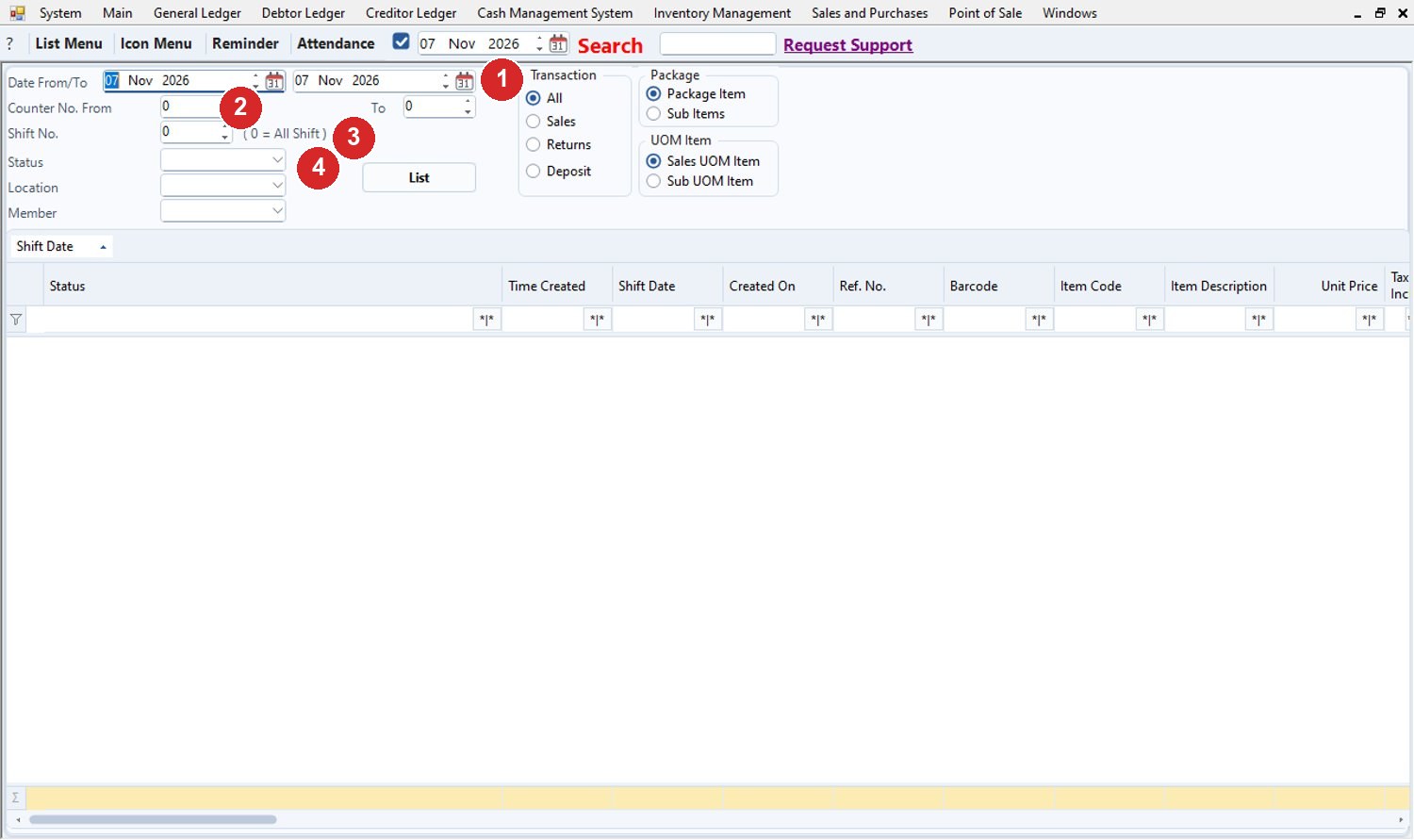
| Step | What to do |
|---|---|
| 1 | Widen Date From and Date To |
| 2 | Check Counter No. |
| 3 | Check Shift No. |
| 4 | Check Status |
4. Are the documents posted?
An unposted invoice can give an empty statement, and unposted or on-hold payments change a balance. For a statement use a wide date range, and apply any open credit. Read the guide “Synergy Acc2026 – Statement of Account: Printing and Wrong Balances”.
5. Is it a Profit and Loss, Balance Sheet or Trial Balance figure?
Closing stock shows only if you key it in, and only on the P&L and Balance Sheet. P&L sales follow sales invoices, not bank receipts. A message that a period is required means a Starting or Ending period is empty. Read the guide “Synergy Acc2026 – P&L, Balance Sheet and Trial Balance: Finding Them and Checking Them”.
6. Is it a stock cost or margin figure?
Costs shown in red are not posted yet. Run Inventory Cost Posting and open the report again. Read the guide “Synergy Acc2026 – Stock Balance, Stock Value, Movement and Cost”.
7. Will the report not open or give an error in Preview?
Choose Microsoft Print to PDF or XPS as the printer before Preview, and check the report path. If reports do not open on one PC, read the guide “Synergy Acc2026 – Reports Will Not Open on a PC”. For layout problems read “Synergy Acc2026 – Fixing a Printed Layout”.
8. Does the message say No permission to print or No permission to export?
Your login lacks the right. Ask your administrator. Read the guide “Synergy Acc2026 – Permission Groups and User Rights”.
Tips
- Not every report has every option box. An option only works on reports that were set up to use it.
- Report screens can save your choices under a name and load them later. Check that Load Saved is ticked if the dates are not what you used last time.
Common problems
The figures still do not agree after these checks.
Contact Synergy support. Have ready the report name, the period or date range, the figures that differ and the figure on the other side, such as a bank, tax or supplier statement.