Restaurant POS System in Malaysia: 8 Common Problems F&B Businesses Face
Watch: taking dine-in and takeaway orders on Synergy F&B POS (1 min 45 s).
Quick Answer
F&B businesses most often run into 8 recurring problems: wrong orders during busy hours, kitchen staff misreading handwritten orders, missed special requests, orders going to the wrong preparation area, confusing table orders, difficulty joining tables or splitting bills, not tracking ingredient usage, and owners not knowing what happened during the day. A restaurant POS system that records orders directly, sends them to the correct kitchen station, and supports table management, split billing, and ingredient tracking can address most of these by organising the whole flow from order to payment.
Running a Restaurant Is Different From a Retail Counter
Running a restaurant or café is very different from running a normal retail counter. A customer may order several dishes — one person wants less spicy, another wants extra rice. Drinks may need to go to one preparation area while food goes to another kitchen. Customers may change tables, combine tables, or ask to split the bill. During busy periods, all of this can happen at the same time.
Small mistakes can quickly become wrong orders, slow service, kitchen confusion, incorrect bills, and unhappy customers. A suitable restaurant POS system can help organise the flow from taking the customer’s order until payment is completed. Here are the 8 most common problems F&B businesses face.
1. Wrong Orders During Busy Hours
During lunch or dinner rush, staff may need to take many orders quickly — this is when mistakes happen. A customer orders Chicken Chop, extra fries, no vegetables, and one iced lemon tea, but only the Chicken Chop and drink reach the kitchen. Or staff accidentally select the wrong table.
Even a small mistake means food may need to be prepared again, ingredients are wasted, customers wait longer, staff need to correct the bill, and kitchen workload increases.
Keep Orders Clear From the Beginning
A restaurant POS system helps staff record orders in a more structured way. Instead of depending only on memory or handwritten notes, the order is entered directly into the system, creating a clearer record of what the customer ordered, quantity, table, add-ons, and special remarks. The clearer the order is at the beginning, the easier it is for the kitchen to prepare it correctly.
2. Kitchen Staff Cannot Read or Understand the Order
Handwritten orders create another problem. During busy hours, handwriting may become difficult to read — a waiter may write “Less spicy + rice + no onion” quickly and the kitchen may misunderstand it. Staff may also need to walk between the dining area and kitchen to pass orders manually, adding unnecessary steps.
Send Clear Orders to the Kitchen
A restaurant POS can send or print orders directly to the kitchen, so kitchen staff receive a clearer order containing the items entered at the counter or dining area. Instead of asking “What did Table 5 order?”, the kitchen can refer to the order received through the system — helping improve communication between front-of-house and kitchen staff.
3. Special Requests and Add-Ons Are Easily Missed
F&B orders are rarely as simple as selecting one product. Customers may request extra cheese, extra rice, no ice, less sugar, less spicy, less oil, hot or cold, large or small size, or additional toppings. If staff need to type or remember every request manually, mistakes become more likely — a customer orders a drink with less sugar, but the drink is prepared normally because the instruction wasn’t clearly communicated, and it needs to be made again.
Organise Add-Ons and Order Remarks
A restaurant POS can allow commonly used add-ons and remarks to be prepared in advance, so staff select the appropriate option when taking the order. For example, a coffee item can offer Hot/Cold, Normal Sugar/Less Sugar/No Sugar, and Regular/Large as preset options; a burger can offer Extra Cheese, Add Egg, or No Onion. This makes common customer requests easier to record consistently.
4. Orders Go to the Wrong Preparation Area
Some restaurants have more than one preparation area — a food kitchen, drink station, dessert station, or bar. An order containing Fried Rice, Iced Coffee, and Cake, if sent to only one printer, may need staff to manually separate it. During busy periods, this creates confusion.
Send Different Items to the Correct Area
A restaurant POS can categorise items and direct them to different kitchen or preparation printers — food to the kitchen printer, drinks to the drink station. This helps each preparation area receive the items it needs to prepare, and reduces the need for staff to manually pass instructions between departments.
5. Table Orders Become Confusing
Table management may sound simple until the restaurant gets busy. Customers arrive, leave, join tables, or move to another table, and several tables may have open orders at the same time. Staff need to know which tables are occupied, which table placed which order, which table hasn’t paid, and whether a customer has moved. Without an organised system, staff may rely on memory or handwritten table numbers.
Keep Table Orders Organised
A restaurant POS with table management allows the restaurant to organise transactions according to the table setup, making it easier for staff to identify active tables and related orders — particularly useful during peak hours when many orders are active at once.
6. Customers Want to Join Tables or Split Bills
A group of customers may begin at two separate tables and later decide to sit together. Or six people eat together but, when it’s time to pay, ask for separate bills. This creates extra work if the system can’t handle the change easily — staff may need to recalculate items manually or prepare several separate bills, which takes time and increases the chance of mistakes.
Handle Different Dining Situations More Easily
A restaurant POS system in Malaysia designed for F&B operations may support a Join Table function, combining several tables into one transaction, and a Split Bill function, dividing one bill when customers want to pay separately. These are small functions, but they can make a big difference when staff are serving many tables during busy periods.
7. You Know What You Sold, but Not What Ingredients Were Used
Restaurants don’t always sell inventory in the same form in which they buy it. A restaurant may buy rice, chicken, cooking oil, cheese, vegetables, and sauce, but the customer buys “Chicken Rice” — a different stock-control challenge compared with a normal retail shop. The restaurant needs to understand how selling a menu item affects the ingredients used to prepare it.
Connect Menu Sales With Raw Materials
Some restaurant POS and inventory setups use a Bill of Material (BOM) to define the ingredients used by a menu item — for example, 1 Chicken Burger may use 1 bun, 1 chicken patty, 1 cheese slice, and 1 portion of sauce. When the menu item is sold, the related raw materials can be reflected in stock records according to the system setup, giving the business a better understanding of ingredient usage instead of looking only at the number of finished dishes sold. See our stock take guide for counting ingredients and recording wastage.
8. The Owner Does Not Know What Happened During the Day
A restaurant owner can’t always stand beside the cashier from opening until closing. At the end of the day, management may want to know how much was sold, which items sold well, which payment methods were used, how much cash should be in the drawer, which shift handled the transactions, and how today’s sales compared with another day or outlet. Without organised sales records, answering these questions may require staff to manually prepare information.
Use Sales Information to Understand the Business
A POS system creates transaction records as sales are processed, which can then be used for sales and management reports. Instead of looking only at the amount of money collected, management can review the business in greater detail — especially useful as the restaurant grows or opens additional outlets.
Restaurant Problems Are Connected
Many restaurant problems don’t happen separately. One customer order can affect several areas: the order is entered, a special request is recorded, the order goes to the kitchen, food is prepared, the table is billed, payment is collected, sales are recorded, and stock or ingredients may be affected. If information is missed at the beginning, the problem can continue throughout the entire process. This is why an F&B POS should support the restaurant’s actual workflow, not simply function as a cash register.
What Should Restaurants Check Before Choosing a POS System?
Before choosing a restaurant POS system, consider how your business actually operates.
Menu
Can the system organise your food and drink menu properly? Can you handle different sizes or variations?
Special Requests
Can staff record instructions such as less sugar, less spicy, extra cheese, extra rice, or hot/cold?
Kitchen
Can orders be sent or printed to the kitchen? If you have several preparation areas, can different items be directed accordingly?
Tables
Can the system handle your restaurant’s table layout? Can tables be joined if required?
Billing
Can bills be split when customers want to pay separately?
Payment
Can you record the payment methods your business accepts?
Stock
If you need ingredient control, can the system manage raw materials or recipe-related stock?
Reports
Can management review daily sales and other useful information?
These questions are often more useful than simply asking “How much does the POS cost?” — the system needs to fit the way your restaurant operates.
Different F&B Businesses Have Different Needs
Not every restaurant needs exactly the same setup.
Café
- Drinks
- Sizes
- Hot or cold options
- Add-ons
- Takeaway
- Quick payment
Full-Service Restaurant
- Table management
- Kitchen orders
- Add-ons and remarks
- Join table
- Split bill
- Multiple kitchen areas
Food Court Stall
- Fast order entry
- Quick payment
- Kitchen printing
- Simple menu selection
Restaurant With Several Outlets
- Outlet sales information
- Centralised reporting
- Consistent menus and pricing
- Multi-outlet management
The POS should match the business instead of forcing every F&B operation into the same workflow.
When Is It Time to Upgrade From a Basic Cash Register?
A basic cash register may be enough for a very simple operation. You may need a proper F&B POS when:
- Staff frequently make order mistakes
- Handwritten orders are difficult to manage
- Kitchen communication is slow
- Special requests are regularly missed
- You need table management
- Customers often request split bills
- You have different kitchen or preparation areas
- You want better sales reports
- Your menu is becoming more complicated
- You need better control of raw materials
- You are opening more outlets
At this stage, the business needs more than a machine that simply calculates the customer’s bill — it needs a system that helps organise the entire sales and ordering process.
How a Restaurant POS System in Malaysia Can Help
A suitable restaurant POS system can help connect important parts of daily F&B operations, including menu items, customer orders, add-ons, special remarks, table management, kitchen orders, multiple kitchen areas, bills, payments, raw-material usage, and sales reports.
The objective is not to add unnecessary complexity — it’s to make common restaurant tasks easier to manage. When the restaurant gets busy, staff should be able to focus on serving customers instead of trying to remember information that could have been recorded clearly in the system.
Synergy Restaurant POS System in Malaysia
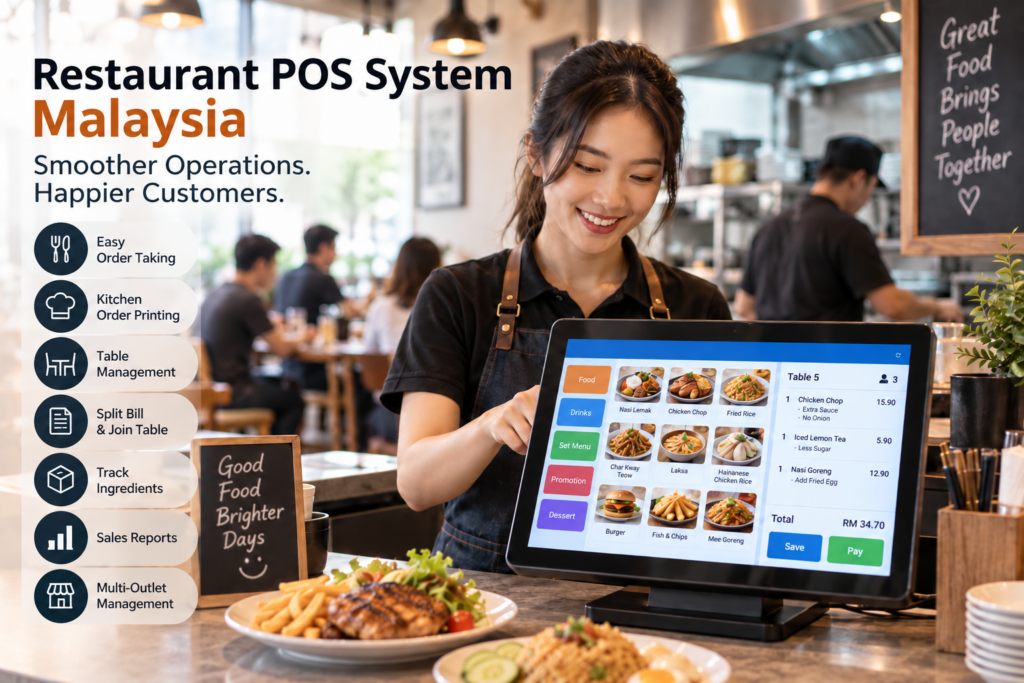
Synergy provides an F&B POS solution for restaurants, cafés, and other food and beverage businesses in Malaysia. Depending on the selected setup, Synergy Restaurant POS supports food and drink menu setup, restaurant table layout, add-on items, food and drink remarks, hot/cold and size variations, kitchen order printing, join table, split bill, multiple printers, multiple kitchen or preparation areas, raw-material tracking, sales reporting, multiple payment methods, and multi-store management.
These functions are designed to help the POS follow the actual restaurant workflow, from order taking through preparation, billing, and reporting. Explore Synergy POS System Malaysia to learn more about the available restaurant and F&B POS setup.
Choose a POS System Based on Your Daily Workflow
A restaurant POS system in Malaysia shouldn’t be chosen only because the screen looks modern. Think about what happens in your restaurant during the busiest hour of the day: How are orders taken? How does the kitchen receive them? How are special requests handled? How are tables managed? What happens when customers split the bill? How do we monitor ingredients? What information does management need at the end of the day?
A POS system that handles these everyday situations well can help make the restaurant easier to operate. The best solution is one that fits the way your F&B business actually works.
Frequently Asked Questions
What is a restaurant POS system?
A restaurant POS system records F&B orders and payments while supporting restaurant workflows such as menu setup, table management, kitchen orders, add-ons, remarks, and sales reporting.
Can a restaurant POS send orders to the kitchen?
Yes. Restaurant POS systems may send or print food and drink orders to the kitchen or relevant preparation area.
Can a POS handle special food requests?
Depending on the system, restaurants can configure add-ons and order remarks such as extra cheese, extra rice, less sugar, or less spicy.
Can restaurant POS systems split bills?
F&B POS systems may support splitting a bill when customers at the same table want to pay separately.
Can a restaurant POS manage several kitchens?
Some systems can categorise menu items and direct orders to different printers or preparation areas, such as a food kitchen and drink station.
Can a restaurant POS manage tables?
Restaurant POS systems may provide table layouts and table-related order management for dine-in operations.
Can a POS track restaurant ingredients?
When the POS is connected with suitable inventory functions, menu items can be linked to raw materials through a Bill of Material setup.
What type of businesses can use an F&B POS system?
Restaurant POS systems can be suitable for restaurants, cafés, food courts, bakeries, beverage shops, and other F&B businesses.